
Quick Summary: AI video editing tools have transformed Facebook ad creation in 2026, enabling marketers to produce professional-quality content in minutes. Top platforms like CapCut, Adobe Premiere Pro with Firefly AI, and specialized tools offer features like auto-captioning, template-based editing, and text-to-video generation. Choosing the right tool depends on budget, technical skill level, and specific campaign needs.
Facebook ads demand attention in milliseconds. Scroll past one mediocre video, and that’s potential revenue lost. The pressure to produce scroll-stopping video content has never been higher, but the good news? AI video editing tools have evolved to meet that challenge head-on.
By 2025, approximately 40% of video editors are expected to utilize AI-driven tools to automate tasks such as color grading and audio enhancement. That number’s only climbed in 2026. These platforms don’t just save time—they democratize professional-quality video production for marketers without film school degrees.
Here’s the thing though—not all AI video editors are created equal. Some excel at quick social cuts, others at polished, broadcast-quality output. Choosing the wrong tool can mean wasted budget and subpar ad performance.
Secure More Sales with Data-Driven Ad Creatives
Extuitive operates as a predictive advertising intelligence platform specifically designed for Shopify brands. It utilizes AI agents to simulate real-world consumer reactions, allowing businesses to identify winning video and image creatives before launching campaigns. By connecting directly to a store, the platform analyzes product data to generate brand-aligned assets and provide performance forecasts.
- Predicts click-through rates and return on ad spend using AI models validated against 150,000+ real-world simulations.
- Generates multi-format ad creatives, including video scripts, UGC-style content, and pricing variants.
- Identifies high-converting audience segments based on psychological profiles and behavioral data.
- Automates the creative testing process to reduce wasted media spend on underperforming ads.
Schedule a demo or start a subscription to scale Facebook campaigns with Extuitive.
What Makes an AI Video Editor Essential for Facebook Ads
Facebook’s algorithm favors video content, particularly in Feed, Stories, and Reels formats. But creating video that converts requires more than just uploading footage. The platform demands specific aspect ratios, punchy pacing, and accessible features like captions.
AI video editing tools tackle these requirements automatically. Auto-captioning ensures accessibility and engagement even when viewers scroll with sound off. Template-based editing maintains brand consistency across campaigns. Text-to-video generation lets marketers create content from product descriptions or blog posts.
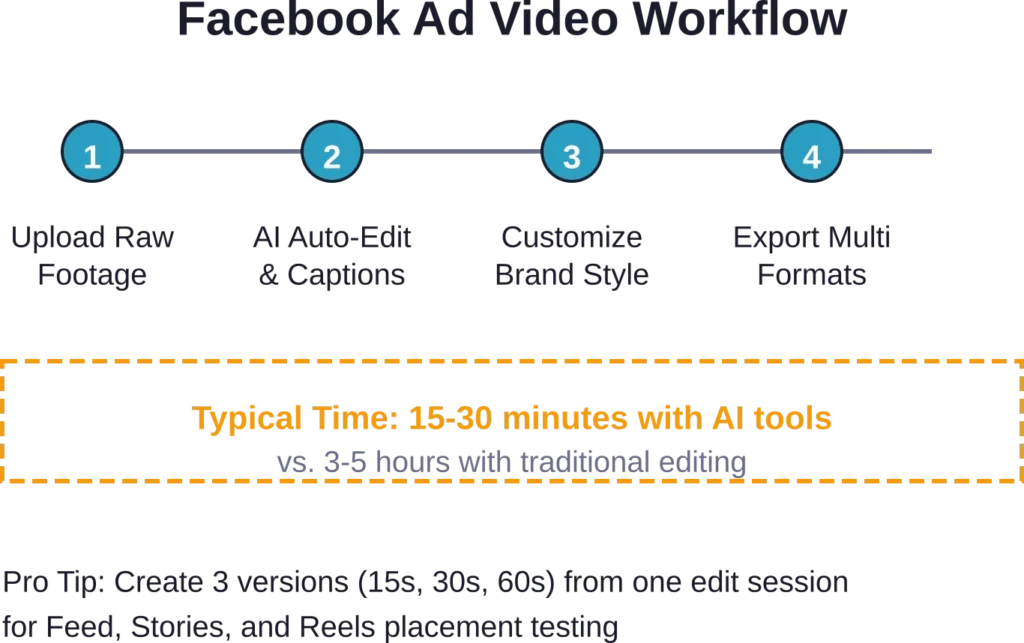
The time savings alone justify the investment. Traditional video editing can consume hours for a single 30-second ad. AI tools compress that timeline to minutes, freeing marketers to focus on strategy rather than technical execution.
Top AI Video Editing Tools for Facebook Ad Creation
The market’s flooded with options, so let’s cut through the noise. These platforms represent the strongest choices for Facebook advertisers in 2026, each with distinct strengths.
CapCut: The Social-First Powerhouse

CapCut has cemented its position as a go-to platform for social media video creation. The web-based AI video maker offers templates specifically optimized for Facebook Feed (1:1 or 16:9), Stories (9:16), and Reels (9:16).
What sets CapCut apart is its intuitive interface combined with surprisingly robust AI features. Auto-captioning with style customization, background removal, and text-to-speech capabilities come standard. The template library includes hundreds of pre-built options designed for quick turnaround.
For Facebook ads specifically, CapCut’s ability to adjust aspect ratios on the fly proves invaluable. A single video can be repurposed across multiple placements without manual resizing. The platform also offers both free and premium tiers, making it accessible for businesses at various budget levels.
Desktop and mobile versions ensure creators can edit anywhere. Real talk: CapCut’s rise reflects the platform understanding that speed and social-native features matter more than Hollywood-grade color wheels for most advertisers.
Adobe Premiere Pro with Firefly AI

Adobe’s integration of Firefly AI into Premiere Pro represents the professional tier of AI video editing. Firefly AI Assistant brings conversational controls to Adobe’s creative suite, allowing editors to make complex adjustments through natural language commands.
According to Adobe’s official blog, Firefly custom models (in public beta) let creators turn their creative style into a reusable model trained on their own images. For brands with established visual identities, this maintains consistency across Facebook ad campaigns without manual effort on every asset.
The platform excels at sophisticated edits—color grading, audio enhancement, and effects that require precision. Premiere Pro AI editing blends automation with manual control, giving experienced editors both speed and flexibility.
The tradeoff? Steeper learning curve and higher cost. Adobe’s ecosystem makes most sense for marketing teams already invested in Creative Cloud or those needing broadcast-quality output for premium campaigns.
Specialized Text-to-Video Platforms
Several platforms focus specifically on generating video from text inputs—blog posts, product descriptions, or scripts. These tools analyze the text and automatically create video sequences with relevant stock footage, transitions, and music.
For Facebook advertisers with extensive written content, text-to-video tools offer a fast path to repurposing existing assets. Product launch announcements become video ads. Blog posts transform into Story content. The quality varies significantly between platforms, so testing is essential.
Keep Feed videos concise—under 2 minutes often works well—while Stories and Reels should be even shorter and punchier, leveraging trending audio and effects. Text-to-video tools that understand these platform-specific nuances deliver better results.
Critical Features to Evaluate Before Choosing
Feature lists look impressive in marketing materials, but not all capabilities matter equally for Facebook ad production. Here’s what actually moves the needle.
Auto-Captioning and Subtitle Generation
The critical role of captions can’t be overstated. Most Facebook users scroll with sound off, especially in public settings. Videos without captions lose engagement immediately.
AI auto-captioning tools analyze audio tracks and generate synchronized text overlays. The best platforms offer style customization—font choice, positioning, highlight colors—to match brand guidelines. Accuracy matters too; some AI captioning still struggles with industry jargon or accents.
Look for platforms that let editors review and correct automated captions before export. Perfectly automated captions don’t exist yet, and typos in ad copy damage credibility.
Template Libraries and Customization
Templates accelerate production, but generic templates scream “generic ad.” The sweet spot is platforms offering extensive template libraries with deep customization options.
Templates should cover common Facebook ad formats: product showcases, testimonials, announcements, before-and-after comparisons. The ability to save custom templates preserves brand consistency across campaigns while maintaining speed benefits.
Some platforms now offer AI-generated templates based on campaign goals. Feed the tool a product image and target audience, and it suggests layout and pacing options optimized for that demographic.
Platform-Specific Optimization
Facebook’s technical requirements shift periodically—recommended aspect ratios, file size limits, duration guidelines. AI tools that automatically optimize exports for specific placements save headaches.
The best platforms offer one-click exports for Feed, Stories, and Reels with appropriate sizing and compression. Testing shows that properly optimized videos see better reach and engagement than generic uploads forced into Facebook’s parameters.
Integration with Advertising Workflows
Video editing is one step in the advertising process. How well does the tool integrate with broader workflows? Can finished videos export directly to Meta Business Suite? Does the platform support collaboration for teams reviewing ad drafts?
Cloud-based tools generally excel here, allowing stakeholders to preview, comment, and approve without file-sharing gymnastics. Desktop software may require additional steps to get content from editing to publication.
| Feature | Why It Matters for Facebook Ads | Priority Level |
|---|---|---|
| Auto-Captioning | Ensures accessibility and engagement for sound-off viewing | Critical |
| Aspect Ratio Presets | Matches Facebook Feed, Stories, Reels specifications | Critical |
| Template Library | Speeds production while maintaining quality | High |
| Brand Kit Storage | Maintains consistency across campaigns | High |
| Collaboration Tools | Streamlines approval workflows | Medium |
| Stock Media Access | Eliminates need for separate stock subscriptions | Medium |
| Advanced Color Grading | Nice for premium brands, overkill for most | Low |
Desktop vs. Online vs. Mobile: Platform Considerations
Where creators actually do the editing work matters more than most realize. Each platform type carries distinct advantages and limitations.
Online editors provide essential tools like auto-captioning and template-based editing accessible from any browser. No installation required, automatic updates, and easy collaboration. The tradeoff is dependency on internet connectivity and sometimes limited advanced features compared to desktop alternatives.
Desktop software typically offers comprehensive tools and better performance for complex projects. Adobe Premiere Pro, for instance, handles 4K footage and multi-layer compositions that would choke browser-based editors. But desktop tools may be OS-specific—some are exclusive to macOS, while others support both Windows and macOS.
Mobile apps are designed for specific platforms, iOS or Android, so compatibility checks matter. CapCut’s mobile version excels for on-the-go editing and quick turnaround, but precise work still benefits from larger screens and more processing power.
For Facebook ad production specifically, most marketers find cloud-based or mobile solutions sufficient. The ads themselves are relatively short, effects requirements modest, and speed often trumps absolute production polish.
Pricing Models and ROI Considerations
AI video editing tools span pricing from completely free to enterprise contracts. Understanding what drives cost differences helps match investment to actual needs.
Free tiers exist across multiple platforms, typically with limitations on export resolution, watermarks, or access to premium templates and stock media. For testing concepts or very small budgets, free tools can work—but watermarked ads look unprofessional.
Subscription models are the norm, ranging from budget-friendly ($10-20/month) to professional tiers ($50-100/month) to enterprise pricing. What separates tiers? Usually export limits, team collaboration features, advanced AI capabilities, and stock media libraries.
Check official websites for current pricing—rates and plan structures change frequently. As of late 2025 and into 2026, most platforms have added AI features to existing subscription tiers rather than charging separately, but that landscape continues evolving.
ROI calculation should factor in time savings, not just subscription cost. An editor that saves five hours per week at a $50/hour labor cost justifies a $250/month subscription. Tools that improve ad performance through better captions or optimization easily pay for themselves through increased conversion rates.
Strategic Implementation for Maximum Ad Performance
Having the right tool means nothing without proper implementation. These practices separate ads that convert from those that drain budget.
Match Video Length to Placement and Goal
Facebook Feed tolerates longer content—up to two minutes—but retention drops sharply after 30 seconds for cold audiences. Stories and Reels demand even tighter pacing, ideally under 15 seconds for maximum completion rates.
AI editing tools can generate multiple cuts from the same source footage. Create a full 60-second version for warm audiences, a punchy 15-second version for cold traffic, and a 30-second middle ground. Testing shows this segmentation significantly improves campaign efficiency.
Front-Load Value and Hooks
The first three seconds determine whether viewers keep watching. AI tools with template libraries often include proven hook patterns—questions, bold statements, visual intrigue.
When using auto-editing features, review the generated opening carefully. Does it grab attention immediately? Generic fade-ins and slow builds kill performance. The best AI editors analyze successful content patterns and prioritize impactful openings.
Leverage Trending Audio Strategically
Reels performance particularly benefits from trending audio, but trends shift rapidly. Some AI platforms now include trending sound libraries updated regularly, eliminating manual research.
The caveat: licensing. Ensure any trending audio used in ads carries proper commercial licensing. Organic content rules differ from paid advertising, and copyright strikes can tank ad accounts.
Test, Measure, Iterate
AI tools make creating variations fast enough that A/B testing becomes practical even for smaller budgets. Test different hooks, caption styles, video lengths, and calls to action.
Facebook’s ad platform provides detailed metrics on video performance—retention graphs, engagement rates, cost per result. Feed that data back into creative decisions. If viewers consistently drop off at the 20-second mark, tighten pacing or restructure content flow.
Common Pitfalls and How to Avoid Them
Even powerful AI tools can produce disappointing results when misused. These mistakes show up repeatedly in failed Facebook ad campaigns.
Over-Reliance on Full Automation
AI editing tools can generate complete videos from minimal input, but fully automated content often lacks the nuance that drives conversions. Generic stock footage paired with robotic transitions might technically qualify as a video, but it won’t outperform competitors.
The solution? Use AI for the heavy lifting—captioning, initial cuts, aspect ratio adjustments—then add human judgment for the final 20%. That’s where brand personality, strategic messaging, and creative differentiation happen.
Ignoring Platform-Specific Best Practices
Creating one video and uploading it everywhere rarely works. Facebook Feed performs best with different pacing than Stories. Reels demand different energy than in-stream ads.
Some AI tools claim to optimize automatically, but “optimization” often means just resizing. True platform optimization considers viewer context, typical sound-on/sound-off ratios, and competitive norms for each placement.
Neglecting Mobile Preview
Desktop editing on a 27-inch monitor can mislead. Text that’s perfectly readable in the editor becomes illegible on a smartphone screen. Visual hierarchy that works large falls apart small.
Always preview exports on an actual mobile device before launching campaigns. Most video views happen on phones, and Facebook’s mobile app is the primary viewing environment. What looks great on desktop might fail entirely on the platform where it actually matters.
Skipping Caption Review
Auto-generated captions have improved dramatically, but they’re not perfect. Misheard words change meaning, awkward phrasing damages credibility, and industry terminology often gets mangled.
Budget two minutes to review and correct automated captions. That small investment prevents embarrassing errors in public-facing ad content. Some brands have learned this lesson the hard way after auto-captions created unintentionally offensive or nonsensical messages.
Emerging Trends in AI Video Editing for 2026
The AI video editing landscape continues evolving rapidly. Several trends are reshaping what’s possible for Facebook advertisers.
Conversational AI Editing Interfaces
Adobe’s Firefly AI Assistant represents the leading edge—conversational interfaces where creators describe desired changes in natural language rather than navigating menus. “Make the intro faster” or “Add captions with brand colors” accomplishes tasks that previously required multiple tool selections.
This approach lowers the skill barrier significantly. Marketers without technical editing knowledge can articulate what they want and let AI handle execution. Expect more platforms to adopt similar interfaces throughout 2026.
Custom Model Training
Firefly’s custom models, which let creators train AI on their own images to maintain consistent style, point toward a future where brand-specific AI editing becomes standard. Rather than starting from generic templates, tools learn what “on-brand” means for specific companies and apply that understanding automatically.
For advertisers managing dozens of product SKUs or running continuous campaigns, this consistency at scale solves a real problem. Current implementation still requires some technical sophistication, but expect simplified versions to reach broader markets soon.
Real-Time Performance Optimization
Some platforms are beginning to integrate performance data directly into editing workflows. Imagine an AI that analyzes which of your past Facebook ads performed best and suggests edits to new content based on those patterns—specific hook types, optimal length, effective caption styles.
This closes the loop between creation and measurement, turning every campaign into training data for better future content. Early implementations exist but expect significant advancement as platforms access more performance data.
Frequently Asked Questions
CapCut offers the most comprehensive free tier for Facebook ad creation, including auto-captions, templates, and aspect ratio presets for Feed, Stories, and Reels. The free version includes watermarks on exports, which limits professional use, but the feature set rivals paid platforms. For completely watermark-free output, limited free trials from premium platforms allow testing before committing to subscriptions.
Not necessarily. Modern AI video editors like CapCut and template-based platforms are designed for users without editing backgrounds. Auto-captioning, pre-built templates, and guided workflows handle technical aspects automatically. That said, understanding basic concepts—pacing, visual hierarchy, call-to-action placement—improves results regardless of the tool. Many platforms include tutorials specifically for beginners.
Optimal length depends on placement and audience temperature. For cold audiences in Feed, 15-30 seconds maximizes completion rates. Warm audiences (retargeting) tolerate 30-60 seconds. Stories and Reels perform best under 15 seconds. The key metric is retention rate—if viewers consistently drop off at a specific timestamp, the video is too long for that audience and placement.
Yes, this is one of AI editors’ strongest features. Platforms like CapCut allow creators to produce one master edit then automatically generate versions optimized for Feed (1:1 or 16:9), Stories (9:16), and Reels (9:16). The AI intelligently reframes content to maintain focus on key elements rather than simply cropping, though reviewing each output ensures nothing critical gets cut off.
Auto-generated captions have improved significantly but still require review. Accuracy typically ranges from 85-95% depending on audio quality, accents, and specialized terminology. For professional ad content, always manually review and correct automated captions before export. The time savings compared to manual captioning remains substantial, even with review included.
Traditional editing software like Adobe Premiere Pro provides granular manual control over every aspect of the video. AI editors automate repetitive tasks—captioning, scene detection, transitions, music matching—reducing manual work. Adobe Premiere Pro with Firefly AI represents a hybrid approach, combining traditional precision with AI automation. For Facebook ads specifically, AI-focused tools often deliver faster results, while traditional software offers more creative control for complex campaigns.
Consider workflow and complexity. Cloud-based editors excel for collaboration, accessibility from any device, and simpler projects like social ads. Desktop software handles more complex edits, larger files, and offers better performance for resource-intensive work. For most Facebook ad production, cloud-based tools provide sufficient capability with better convenience. Desktop software makes sense for teams already invested in professional workflows or requiring advanced color grading and effects.
Conclusion
AI video editing tools have fundamentally changed what’s possible for Facebook advertisers in 2026. Speed, accessibility, and capability that once required professional production teams now sit within reach of small marketing departments and solo entrepreneurs.
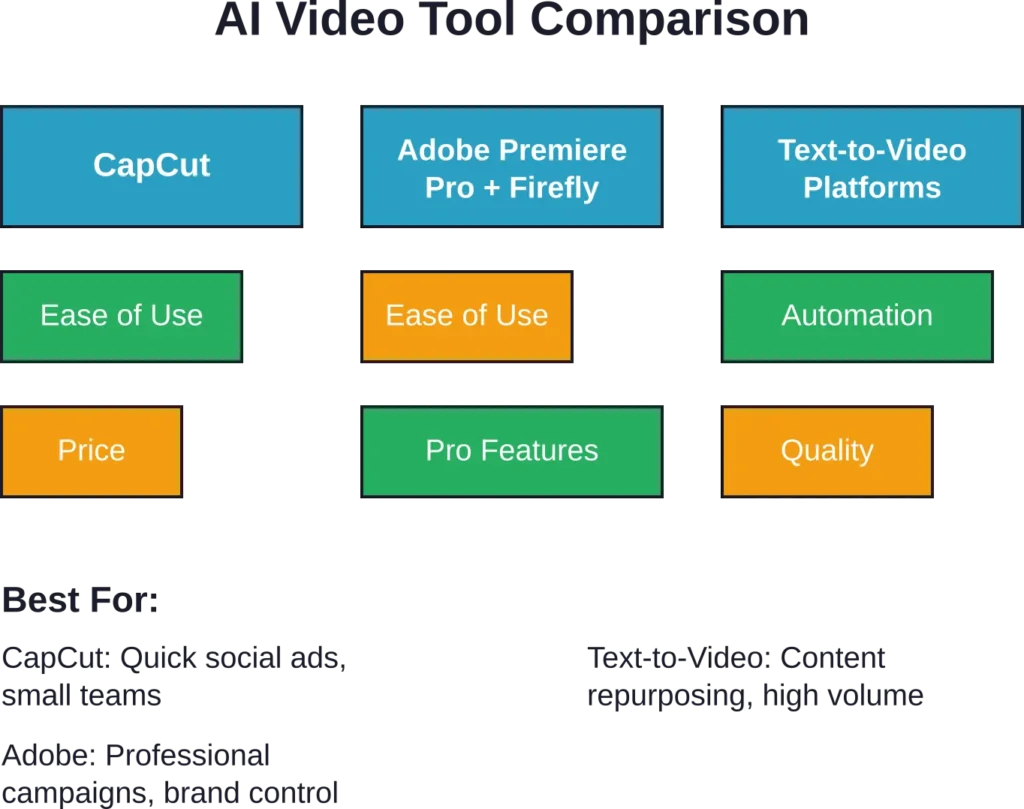
CapCut dominates the social-first category with templates and optimization built specifically for platforms like Facebook. Adobe Premiere Pro with Firefly AI serves professional teams needing brand consistency and advanced control. Specialized text-to-video platforms help repurpose existing content into video formats fast.
The right choice depends on specific needs—budget, team size, technical skill, and campaign complexity. But here’s what doesn’t change: video content continues dominating Facebook’s algorithm and user attention. Advertisers who leverage AI tools to produce better content faster gain competitive advantage.
Start with clear goals. What type of ads need creation most frequently? What’s the current production bottleneck? Match tool capabilities to those specific needs rather than chasing feature lists.
Most platforms offer free trials or free tiers. Test before committing. Create a real ad for an actual campaign rather than just exploring features. How the tool performs under real conditions matters more than demo videos.
The AI video editing landscape will keep evolving—new features, new platforms, new capabilities. But the fundamentals remain consistent: engaging content that respects platform best practices, delivers value quickly, and includes accessible features like captions will outperform generic uploads regardless of which AI tool creates it.
Ready to transform Facebook ad production? Choose a platform from this guide, create a test campaign, and measure results against current performance. The time investment in learning a new tool pays dividends in every campaign that follows.