

Quick Summary: Amazon analytics tools fall into three core categories: profit and financial trackers (like Sellerboard and SellerLegend), keyword and SEO research platforms (like Helium 10 and Jungle Scout), and market intelligence solutions (like SmartScout). AWS-native options like Amazon QuickSight and Amazon Athena provide enterprise-grade analytics for brands managing massive datasets, with pricing starting at $24/month for QuickSight Authors. The right tool depends on your business model—whether you’re optimizing for profit margins, product discovery, or competitive positioning.
The Amazon marketplace generates billions in transactions every quarter. Yet most sellers operate half-blind, relying on Seller Central’s basic reports while competitors pull detailed insights from specialized analytics platforms.
Here’s the thing though—not all Amazon analytics tools solve the same problem. Some track profit down to the SKU level. Others reverse-engineer competitor keywords. A third category maps entire market niches before products even launch.
This guide breaks down 15+ analytics platforms across every major category. Real pricing, actual feature sets, and honest assessments of what works for different seller profiles in 2026.
What Amazon Analytics Tools Actually Do (And Why Seller Central Isn’t Enough)
Amazon Seller Central provides basic reporting. Sales summaries, order counts, traffic by ASIN. But those native dashboards miss critical data that separates profitable sellers from those grinding at break-even.
The gap shows up fast. Seller Central won’t tell you that advertising costs ate 30% of your margin last month. It can’t show which keywords competitors rank for that you’re missing. And it definitely won’t calculate true net profit after accounting for storage fees, returns, and PPC spend across multiple campaigns.
Third-party analytics tools fill three distinct needs:
- Profit and financial tracking – Real-time P&L at the SKU level, accounting for every Amazon fee, advertising cost, and operational expense
- Market intelligence – Niche analysis, competitor revenue estimates, and brand positioning before you commit inventory capital
- Keyword and SEO research – Reverse ASIN lookups, search volume data, and ranking tracking that surfaces how buyers actually find products
Each category solves different problems. Most successful sellers use at least two—a profit tracker plus either keyword research or market intelligence, depending on whether they’re optimizing existing listings or launching new products.
Best Keyword Research and SEO Analytics Tools
Keyword tools reverse-engineer Amazon’s search algorithm. They show which terms buyers actually type, which keywords competitors rank for, and what search volume looks like before you optimize a listing or launch a PPC campaign.
The best tools combine three data sets: Amazon autocomplete scraping, clickstream data from browser extensions, and Amazon’s own advertising API. That triangulation produces search volume estimates accurate enough to base product decisions on.
WisePPC

WisePPC is a specialized Amazon PPC optimization platform focused on advanced campaign management, deep performance analytics, and long-term historical data. It goes far beyond Amazon’s native 60-90 day data retention, giving sellers full control through powerful bulk operations and granular insights.
Pricing starts on a contact-vendor / tiered model (currently in open beta with very attractive early-user terms and lifetime discounts available).
Best for: Sellers and brands spending $3,000–$50,000+ per month on Amazon ads who need powerful bulk management, long-term trend analysis, and visibility that Amazon Ads Console simply doesn’t provide. Perfect for those who want maximum control rather than full autopilot.
Key features:
- Bulk actions — edit 10,000+ campaigns, ad groups, and targets in seconds using smart filters
- Advanced multi-metric charts supporting up to 6 metrics simultaneously with flexible time aggregation (day/week/month/year)
- Gradient-based highlighting and anomaly detection for instant identification of winners and losers
- Placement performance analysis and critical data segmentation (match type, campaign type, bid strategy, etc.)
- Long-term historical data storage (years of data) with hourly granular insights per target and placement
- Inline editing of bids, budgets, names, and statuses directly in tables
Limitations: Primarily focused on PPC management and advanced analytics (weaker on keyword discovery or listing optimization compared to all-in-one platforms like Helium 10). As a relatively new platform in active development (open beta in 2026), some advanced automation features are still being rolled out.
Contact Information:
- Website: wiseppc.com
- Facebook: www.facebook.com/people/Wise-PPC/61573154427547
- LinkedIn: www.linkedin.com/company/wiseppc
- Instagram: www.instagram.com/wiseppc
Helium 10

Helium 10 bundles keyword research with listing optimization, inventory management, and PPC automation. The Cerebro tool reverse-searches any ASIN to reveal every keyword it ranks for, along with search volume and estimated competition.
Pricing starts at $39/month. Full platform access runs higher but includes tools beyond keyword research—listing builders, refund recovery, and split testing.
Best for: Sellers who want an all-in-one platform. If keyword research is just one part of your workflow, Helium 10’s bundled tools justify the higher price versus standalone keyword trackers.
Key features:
- Cerebro reverse ASIN lookup with competitor keyword overlap analysis
- Magnet keyword research tool with search volume and trend data
- Frankenstein and Scribbles for listing optimization
- Index Checker to verify which keywords Amazon actually indexed
Limitations: The interface is dense. New users face a steep learning curve. And the free plan is too limited for serious research—most features require a paid subscription.
Jungle Scout

Jungle Scout started as a product research tool but now includes strong keyword capabilities. The Keyword Scout feature provides search volume estimates, PPC bid suggestions, and seasonal trend charts.
Pricing starts at $49/month. The tool integrates product research and keyword analysis, making it efficient for sellers evaluating new product ideas and optimizing listings simultaneously.
Best for: Product researchers who need keyword data as part of niche validation. Jungle Scout’s strength is tying keyword volume to product opportunity scores, helping prioritize which niches to enter.
Key features:
- Keyword Scout with search volume and PPC cost estimates
- Product Database for finding high-opportunity niches based on search demand
- Rank Tracker for monitoring keyword positions over time
- Listing Builder that auto-optimizes for high-volume keywords
Limitations: Keyword data is less granular than Helium 10’s Cerebro. The tool focuses more on product discovery than deep keyword optimization for existing catalogs.
Amazon Ads Console and Marketing Stream

Amazon’s native advertising platform provides search term reports, campaign performance data, and (for brands with high ad spend) access to Amazon Marketing Stream—a real-time data feed for advertising metrics.
The Ads Console is free for all sellers running Sponsored Products, Sponsored Brands, or Sponsored Display campaigns. Marketing Stream requires API access and is typically used through third-party tools or custom integrations.
Best for: Brands already running significant PPC campaigns. The search term report reveals exactly which customer queries triggered ads and converted, providing keyword insights based on actual buyer behavior rather than estimates.
Key features:
- Search term report showing customer queries, impressions, clicks, and conversions
- Bid optimization suggestions based on campaign performance
- Placement reporting (top of search vs. product pages)
- Marketing Stream for hourly campaign data updates (API access required)
Limitations: The data only covers keywords you’re already bidding on. It won’t reveal new keyword opportunities or competitor rankings unless you’re actively running ads against those terms.
Best Profit and Financial Analytics Tools
Financial analytics tools answer one question: what’s the actual profit per product after every fee and expense? Seller Central’s Business Reports don’t break this down. They show gross sales, but miss advertising spend, refund rates, long-term storage fees, and dozens of other line items that quietly drain margin.
Community discussions highlight that missing these “hidden” fees can result in profit calculations that are off by 10-30% for high-volume sellers. That’s not a rounding error. That’s the difference between a sustainable business and burning cash while sales climb.
Sellerboard

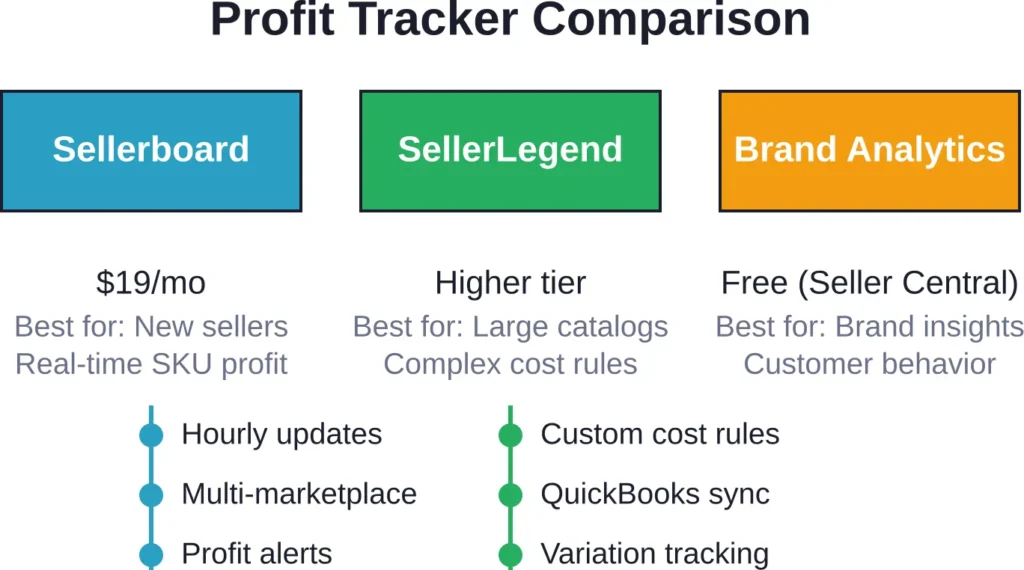
Sellerboard builds real-time profit dashboards at the SKU level. It pulls data directly from Amazon’s API and reconciles every transaction—sales, refunds, advertising costs, FBA fees, storage charges—into a single P&L view.
Pricing starts at $19/month. The platform updates hourly, so profit margins reflect current performance rather than yesterday’s snapshot.
Best for: FBA sellers who need accurate profit tracking without learning complex spreadsheet models. The dashboard shows net margin after all fees, making it immediately clear which products actually make money.
Key features:
- Automated P&L calculations including PPC, refunds, promotions, and FBA fees
- Email alerts when profit margins drop below set thresholds
- Multi-marketplace support (US, UK, DE, FR, IT, ES, CA, MX)
- Inventory performance tracking with reorder suggestions
Limitations: The interface prioritizes FBA sellers. FBM or hybrid models work, but require manual input for some fulfillment costs.
SellerLegend

SellerLegend focuses on brands managing multiple ASINs with complex cost structures. The platform handles variations, bundles, and multi-channel fulfillment with more granular cost assignment than most competitors.
Pricing reflects the enterprise feature set—higher than entry-level tools but justified for sellers managing 50+ SKUs or brands with private label products that have fluctuating COGS.
Best for: Established brands that need detailed financial reporting across large catalogs. Particularly strong for businesses where different products have different cost structures (varying suppliers, multiple warehouses, seasonal pricing).
Key features:
- Customizable cost rules per SKU or product group
- Profit tracking for bundles and variation families
- Historical trend analysis with year-over-year comparisons
- Integration with QuickBooks and Xero for accounting workflows
Limitations: Overkill for sellers with simple catalogs. The learning curve is steeper than simpler tools like Sellerboard.
Amazon Brand Analytics (Seller Central – Free)
Brand Registry members get access to Amazon Brand Analytics at no additional cost. It’s not a full profit tracker, but it surfaces customer behavior data that paid tools can’t match.
The Search Terms report shows exactly what phrases shoppers typed before purchasing. The Market Basket Analysis reveals which products customers buy together. And the Demographics data breaks down buyer age, income, and education—first-party insights directly from Amazon.
Best for: Registered brands that want to understand buyer behavior without paying for third-party market research. The data is 100% first-party accurate and comes directly from Amazon at no extra cost.
Key features:
- Top search terms and conversion share by keyword
- Repeat purchase behavior tracking for customer lifetime value analysis
- Item comparison and alternate purchase data
- Demographics by ASIN (age, household income, education, gender, marital status)
Limitations: Requires Brand Registry enrollment. Data updates weekly, not in real-time. No profit calculations or advertising cost integration.
Best Market Intelligence and Competitive Analysis Tools
Market intelligence tools map the competitive landscape before you commit capital. They estimate competitor revenue, track brand market share, and surface underserved niches where demand exceeds supply.
These platforms scrape Amazon continuously, building databases of sales estimates, review velocity, and pricing trends across millions of ASINs. The goal: identify opportunities and threats faster than competitors operating on instinct.
SmartScout

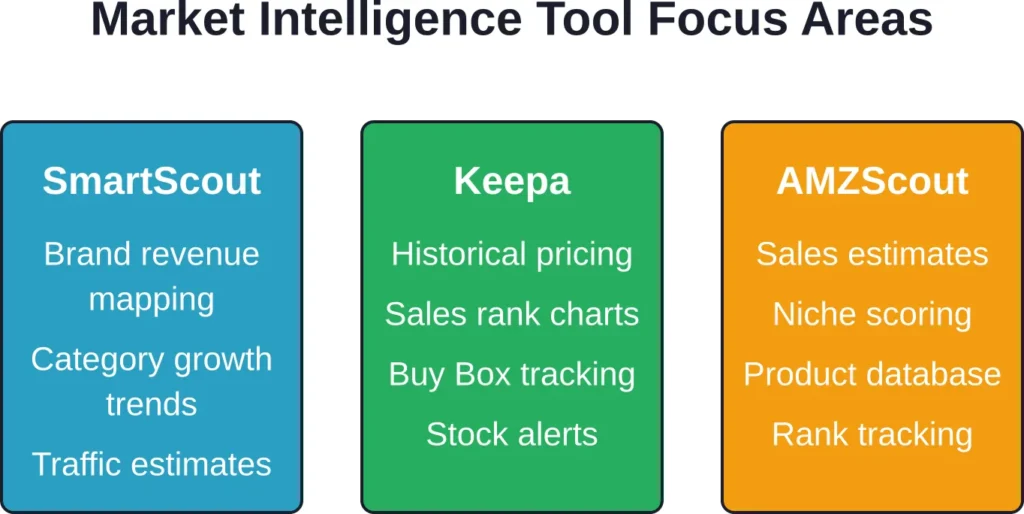
SmartScout focuses on market-level analysis rather than individual product tracking. The platform maps revenue by brand, category, and subcategory—showing where money flows and which niches are growing versus saturating.
Pricing starts at $29/month. The tool is particularly strong for sellers evaluating multiple niches or brands considering expansion into adjacent categories.
Best for: Strategic planning and niche selection. SmartScout answers questions like “Which subcategories in Kitchen & Dining are growing fastest?” or “What’s the total addressable market for silicone baking mats?”
Key features:
- Brand revenue estimates across Amazon’s catalog
- Traffic insights showing estimated sessions per ASIN
- Submarket analysis with growth trends and saturation scores
- FBA vs. FBM competitive mix by category
Limitations: Revenue estimates are modeled, not exact. The tool provides directional accuracy but shouldn’t be treated as audited financials. Best used for comparative analysis rather than absolute numbers.
Keepa

Keepa tracks price history, sales rank changes, and Buy Box ownership over time. The browser extension overlays charts directly on Amazon product pages, showing how pricing and availability fluctuate.
Pricing is €19/month for full API access and detailed historical data. The free browser extension provides basic price tracking but limits historical depth.
Best for: Resellers, arbitrage sellers, and brands monitoring MAP compliance. Keepa’s price history charts reveal when competitors drop prices, when products go out of stock, and how seasonal demand cycles affect rank.
Key features:
- Historical price tracking (Amazon, third-party sellers, warehouse deals)
- Sales rank charts showing demand fluctuations over months or years
- Buy Box statistics revealing who wins the Buy Box and at what price
- Product alerts for price drops, stock availability, or rank changes
Limitations: Keepa excels at historical data but doesn’t estimate revenue or keyword rankings. It’s a complementary tool rather than a standalone market intelligence platform.
AMZScout

AMZScout combines product research, sales estimation, and keyword tracking in one platform. The PRO Extension provides instant sales estimates and niche scores directly on Amazon search results pages.
Pricing varies by bundle.
Best for: New sellers validating product ideas. AMZScout’s niche score incorporates demand, competition, and seasonality into a single metric, simplifying decision-making for users who don’t want to analyze raw data manually.
Key features:
- Sales estimator with monthly revenue projections per ASIN
- Product Database for filtering by category, price, reviews, and rank
- Keyword Tracker monitoring rankings across search terms
- Niche scoring system rating opportunities on a 1-10 scale
Limitations: Sales estimates are less accurate in low-volume niches. The scoring system simplifies analysis but can oversimplify—high scores don’t guarantee success without deeper validation.
AWS Analytics Solutions for Enterprise Amazon Sellers
Large brands and agencies managing hundreds of ASINs or multiple marketplaces often outgrow third-party seller tools. Data volume, custom reporting needs, and integration requirements push these operations toward AWS-native analytics platforms.
AWS offers enterprise-grade tools designed for massive datasets and complex queries. These aren’t plug-and-play solutions like Helium 10. They require technical setup. But for organizations with data teams, the flexibility and scalability justify the complexity.
Amazon QuickSight
Amazon QuickSight is a serverless business intelligence service built for visualizing and analyzing data at scale. It integrates with Amazon S3, Athena, Redshift, and dozens of other data sources—making it powerful for brands pulling data from Seller Central APIs, advertising platforms, and external systems.
According to official pricing (April 29, 2026), QuickSight Authors cost $24 per user/month and Readers cost $3 per user/month, with capacity-based pricing also available.
Best for: Brands with technical resources who need custom dashboards combining Amazon sales data, advertising metrics, inventory levels, and external data (like Shopify sales or Google Analytics traffic). QuickSight scales to petabytes without infrastructure management.
Key features:
- Natural language queries using AI-powered Q&A
- Embedded analytics for white-label reporting to stakeholders or clients
- ML-powered anomaly detection and forecasting
- Real-time dashboards with auto-refresh from streaming data sources
Limitations: Requires data engineering knowledge to set up pipelines. Not a turnkey solution for small sellers without technical teams. Setup complexity is high compared to plug-and-play seller tools.
Amazon Athena
Amazon Athena is a serverless query service that lets users run SQL queries directly against data stored in Amazon S3. No database servers to manage—just point Athena at S3 buckets containing CSV, JSON, or Parquet files and start querying.
Pricing is straightforward: $5 per TB of data scanned. According to official pricing (April 29, 2026), a query scanning 3 TB would cost $15. Compression and columnar formats like Parquet can reduce costs significantly—one example showed 3x savings from compression and 4x savings from reading only necessary columns, reducing a query cost from $15 to $1.25.
Best for: Data analysts who need ad-hoc querying without maintaining databases. Athena works well for brands exporting Seller Central reports to S3 and running custom queries to answer specific business questions—like “Which ASINs had negative profit margins in Q1 after advertising costs?”
Key features:
- Standard SQL syntax (ANSI SQL compatible)
- Integration with AWS Glue for schema management
- Federated queries across multiple data sources (S3, RDS, DynamoDB, on-premises databases)
- No infrastructure provisioning or server management
Limitations: Query performance depends on data format and partitioning strategy. Poorly structured S3 data can result in slow queries and high costs. Best suited for technical users comfortable with SQL.
Amazon CloudWatch
Amazon CloudWatch monitors application performance, logs, and metrics across AWS infrastructure. For Amazon sellers using custom applications (inventory management systems, pricing bots, API integrations), CloudWatch provides real-time observability.
Pricing is usage-based. According to official pricing (April 29, 2026), CloudWatch’s free tier includes 5 GB of log ingestion, 1,800 minutes of Live Tail usage per month, and basic metrics for most AWS services. Custom metrics cost $0.30 per metric per month. An example shows detailed monitoring for 5 EC2 instances (7 metrics each) costs $10.50 per month.
Best for: Brands running custom applications on AWS that interact with Amazon’s SP-API or Advertising API. CloudWatch ensures those integrations run reliably, alerting teams when API calls fail or performance degrades.
Key features:
- Real-time log aggregation and search
- Custom metric dashboards for application performance
- Alarms and automated responses (trigger Lambda functions, send SNS notifications)
- Integration with QuickSight for log visualization
Limitations: Overkill for sellers not running custom applications. CloudWatch is infrastructure monitoring, not a business analytics tool. It complements platforms like QuickSight but doesn’t replace seller-focused analytics.
| AWS Service | Primary Use | Pricing Model | Technical Skill Required |
|---|---|---|---|
| Amazon QuickSight | BI dashboards and visualization | $24/user/mo (Author), $3/user/mo (Reader) | Medium (data pipelines needed) |
| Amazon Athena | Ad-hoc SQL queries on S3 data | $5 per TB scanned | High (SQL knowledge required) |
| Amazon CloudWatch | Application monitoring and logs | $0.30/custom metric/mo + usage fees | High (DevOps background helpful) |
Free Amazon Analytics Tools Worth Using
Not every seller has budget for premium tools. Several free options provide real value, especially for those just starting or testing new niches before committing to paid platforms.
Amazon Seller Central Reports
Seller Central includes Business Reports, Payment Reports, and Advertising Reports at no cost. These cover sales by ASIN, traffic sources, conversion rates, and advertising spend.
The limitation is integration. Data lives in separate silos—business reports don’t automatically merge with advertising costs or FBA fees. Manual reconciliation is required, which scales poorly as catalog size grows.
Still, for sellers with fewer than 10 SKUs, Seller Central’s native reports provide enough data to make informed decisions without third-party tools.
Google Keyword Planner

Google Keyword Planner estimates search volume for Google, not Amazon. But keyword behavior overlaps significantly—terms with high Google volume often signal strong Amazon demand.
The tool is free with a Google Ads account. Use it to validate product ideas and identify seasonal trends before investing in Amazon-specific keyword tools.
Keepa Free Browser Extension
Keepa’s free browser extension overlays basic price history on Amazon product pages. The free version limits historical depth and doesn’t include API access, but it’s sufficient for quick competitive checks or spotting pricing patterns.
For resellers evaluating arbitrage opportunities, the free extension provides enough data to avoid overpaying for inventory that regularly drops in price.
How to Choose the Right Amazon Analytics Stack
Most sellers don’t need every tool in this guide. The right stack depends on business model, catalog size, and growth stage.
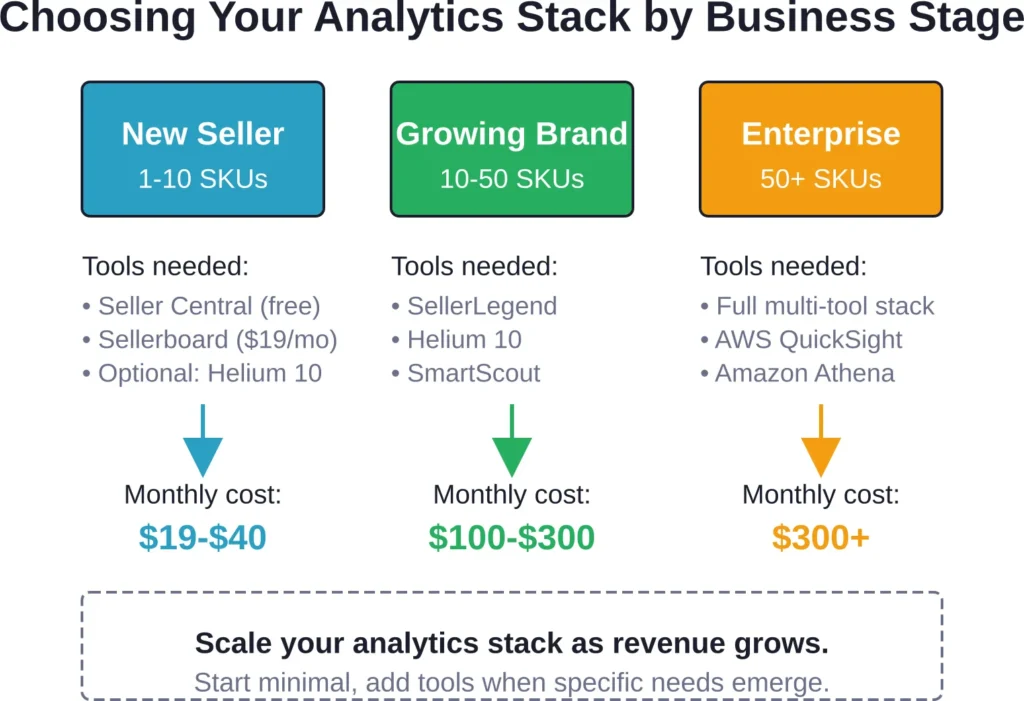
New sellers (1-10 SKUs): Start with Amazon Seller Central’s free reports plus one profit tracker like Sellerboard. Add a keyword tool (Helium 10 or Jungle Scout) only if launching new products or optimizing underperforming listings.
Growing brands (10-50 SKUs): Profit tracking becomes critical at this scale. Sellerboard or SellerLegend should be the foundation. Add Helium 10 for keyword research and listing optimization. Consider SmartScout if evaluating expansion into new categories.
Established brands (50+ SKUs or multiple marketplaces): Multi-tool stacks are common. Profit tracking (SellerLegend), keyword research (Helium 10), market intelligence (SmartScout), and competitive monitoring (Keepa) cover most needs. Brands with internal data teams may transition to AWS solutions like QuickSight for custom reporting.
Agencies and aggregators: Client reporting and cross-account analytics require flexibility. QuickSight’s embedded analytics and Reader pricing make it cost-effective for delivering white-label dashboards. Combine with Athena for ad-hoc queries across client datasets stored in S3.
Common Mistakes When Using Amazon Analytics Tools
Analytics tools provide data. But data without context leads to bad decisions. These mistakes show up repeatedly in community discussions and seller experiences.
Trusting Revenue Estimates as Absolute Truth
Market intelligence tools estimate competitor revenue using models based on sales rank, reviews, and pricing. Those estimates are directionally useful but not exact.
Treating a $50,000/month estimate as fact leads to flawed ROI calculations. Use estimates for comparative analysis (“Product A does roughly 2x the volume of Product B”) rather than precise forecasting.
Ignoring Hidden Fees in Profit Calculations
Seller Central shows gross sales. Third-party tools calculate profit. But some fees—storage surcharges, long-term storage, removal orders, refund processing—don’t always sync immediately.
Community discussions note that missing 10-30% of these hidden fees results in profit dashboards that look healthy while bank accounts drain. Reconcile tool data with actual Amazon payouts monthly to catch discrepancies.
Chasing Every Keyword Without Prioritizing ROI
Keyword tools surface hundreds of search terms. New sellers often try to optimize for all of them, diluting focus and spreading PPC budgets thin.
Better approach: rank the top 10-15 keywords by search volume and conversion potential. Optimize listings and PPC around those. Ignore long-tail terms until the high-volume targets are maximized.
Over-Relying on Tools Instead of Testing
Analytics tools provide hypotheses. Real buyers provide answers. A keyword tool might suggest a phrase has high volume, but only a live PPC campaign reveals whether that traffic converts.
Use tools to guide testing, not replace it. Run small budget tests on new keywords, pricing strategies, or product variations. Scale what works based on actual performance, not modeled projections.
Future of Amazon Analytics in 2026 and Beyond
The Amazon analytics landscape continues evolving. Three trends are reshaping what sellers need and how tools deliver it.
AI-Powered Insights
Tools like Amazon QuickSight now include AI-powered features such as natural language queries and anomaly detection. Sellers can ask “Which products had unusual profit drops last week?” and get instant answers without writing SQL.
Expect more tools to embed AI for predictive forecasting, automated alert generation, and anomaly detection. The shift is from “here’s the data” to “here’s what the data means and what action to take.”
Real-Time Data Streams
Amazon Marketing Stream provides hourly advertising updates. Other tools are moving toward real-time syncs rather than overnight batch processing.
Real-time data matters most for fast-moving categories where prices and Buy Box ownership change hourly. Brands in competitive niches gain edge by reacting faster than competitors waiting for daily reports.
Cross-Channel Integration
Brands selling on Amazon, Shopify, Walmart, and retail channels need unified analytics. Tools that aggregate data across platforms—combining Amazon FBA with DTC Shopify sales and wholesale orders—eliminate manual reconciliation.
AWS tools like QuickSight and Athena already support this through flexible data source connectors. Expect seller-focused tools to follow, offering multi-channel dashboards as DTC brands expand beyond Amazon.
Frequently Asked Questions
Amazon Brand Analytics is free for Brand Registry members and provides first-party data directly from Amazon—search terms, demographics, repeat purchase behavior. Third-party tools add profit tracking, keyword research, and competitive intelligence that Brand Analytics doesn’t cover. Most registered brands use both: Brand Analytics for buyer behavior insights and third-party tools for financial tracking and market research.
Even with 3-5 SKUs, manual profit tracking becomes error-prone once advertising, promotions, and FBA fees are factored in. A basic profit tracker like Sellerboard ($19/month) pays for itself by catching fee errors or highlighting which products actually drive margin. Seller Central’s reports won’t show real net profit after all expenses—third-party tools do.
Helium 10 offers the deepest keyword database with tools like Cerebro for reverse ASIN lookups. Jungle Scout provides strong keyword data tied to product opportunity scores, making it better for sellers validating new niches. For brands already running PPC, Amazon Ads Console’s search term report provides first-party conversion data based on actual buyer queries.
Generally not. AWS tools require technical setup and are designed for enterprise-scale data. Small sellers (under 50 SKUs) get better ROI from plug-and-play platforms like Helium 10 or Sellerboard. QuickSight makes sense for brands with data teams, multiple marketplaces, or custom reporting needs that third-party tools can’t meet.
Sales estimates are modeled approximations, not exact figures. Tools base estimates on sales rank, review velocity, and pricing—but don’t have access to Amazon’s actual sales data. Accuracy is directional: good enough for comparative analysis (“Competitor A does 3x the volume of Competitor B”) but not for precise revenue forecasting. Always validate with test orders or PPC data before committing large inventory buys.
Yes, for basic operations. Amazon Seller Central reports, Brand Analytics (for registered brands), Google Keyword Planner, and Keepa’s free browser extension provide enough data for sellers with small catalogs or tight budgets. Limitations appear as catalog size grows—manual reconciliation becomes time-consuming and error-prone. Most sellers graduate to paid tools once they hit 10+ SKUs or start running multi-campaign PPC.
Agencies benefit from platforms with multi-account support and white-label reporting. Amazon QuickSight offers embedded analytics and Reader pricing ($3/user/month), making it cost-effective for client dashboards. Combine with Helium 10’s agency plan for keyword research and SellerLegend or similar for profit tracking. The goal is centralized data pipelines with client-specific views—AWS tools excel here if the agency has technical resources.
Building Your Amazon Analytics Stack for 2026
The Amazon analytics landscape offers tools for every business model and budget. The key is matching capabilities to actual needs rather than buying every platform competitors use.
Start with profit tracking. Without accurate margin data, every other optimization is guesswork. Add keyword research tools when launching products or fixing underperforming listings. Layer in market intelligence if evaluating new niches or monitoring competitive shifts.
For enterprise operations, AWS tools like QuickSight and Athena provide flexibility that third-party platforms can’t match—but only if technical resources exist to build and maintain data pipelines.
Most sellers find their optimal stack combines 2-3 specialized tools rather than one all-in-one platform. Profit tracking from Sellerboard or SellerLegend, keyword research from Helium 10, and market monitoring from SmartScout or Keepa covers the majority of strategic decisions.
The analytics tools exist. The data is accessible. What separates successful sellers from struggling ones isn’t access to information—it’s the discipline to act on insights consistently. Choose tools that answer your specific questions, integrate them into regular decision-making workflows, and test recommendations before scaling.
Ready to upgrade your Amazon analytics? Start with one tool in the category where you have the biggest blind spot—profit tracking if margins are unclear, keyword research if traffic is stagnant, or market intelligence if you’re evaluating expansion. Add tools incrementally as needs prove themselves, and review your stack quarterly to cut platforms that don’t drive decisions.