

Quick Summary: Amazon offers two distinct ecosystems of data analytics tools: AWS Analytics services (like Athena, Redshift, QuickSight, EMR, and Kinesis) for cloud-based enterprise data infrastructure, and third-party marketplace analytics tools (like WisePPC, Jungle Scout, Helium 10, and Sellerboard) specifically designed for Amazon sellers to track product performance, advertising, and profitability. AWS services provide the technical backbone for processing massive datasets, while seller tools deliver actionable business intelligence for e-commerce optimization.
The term “Amazon data analytics tools” creates immediate confusion. Are we talking about AWS services that process petabyte-scale data, or the niche software Amazon sellers use to track product rankings?
Both. And they couldn’t be more different.
This guide separates the two categories clearly. We’ll start with third-party marketplace analytics tools that Amazon sellers use daily, then move to AWS’s enterprise-grade analytics services. No fluff, no invented statistics—just what matters in 2026.
Understanding the Two Amazon Analytics Ecosystems
Before diving into specific tools, the distinction matters. AWS analytics services and Amazon seller tools solve completely different problems for completely different users.
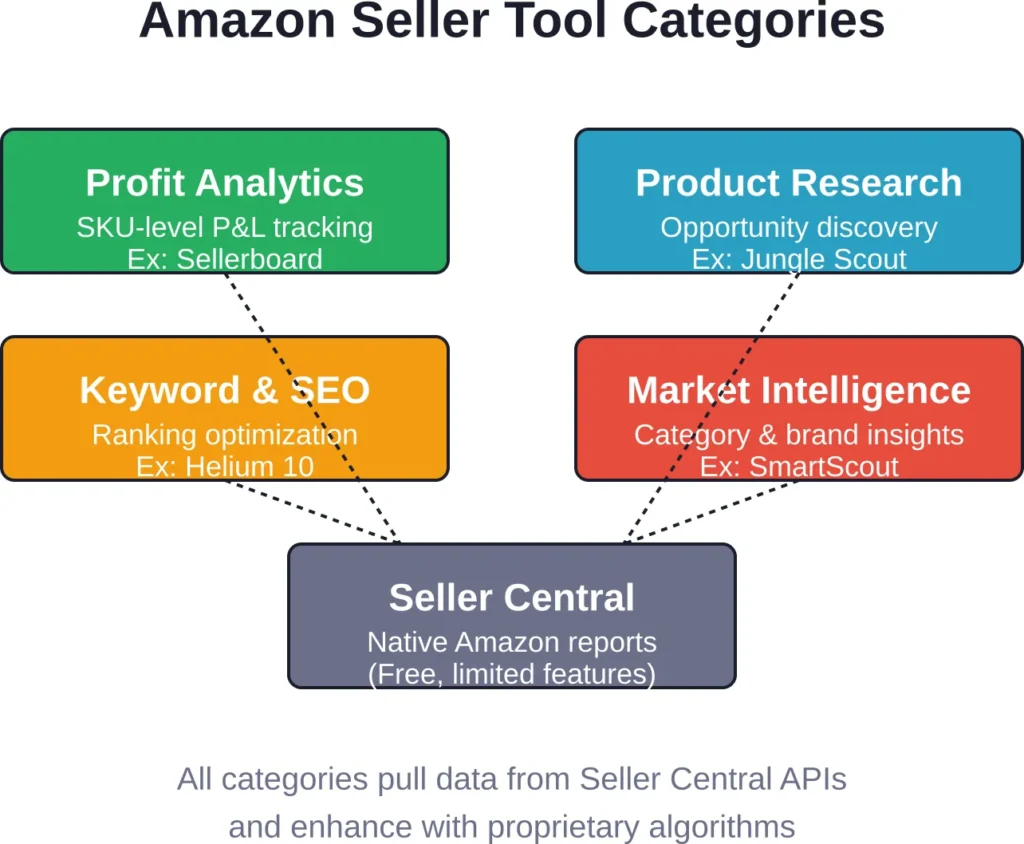
Third-Party Amazon Marketplace Analytics Tools are built specifically for Amazon sellers and vendors. They track product rankings, advertising metrics, competitor prices, keyword performance, inventory levels, and profitability at the SKU level. These are the tools that most sellers use daily (WisePPC, Jungle Scout, Helium 10, Sellerboard, SmartScout and others).
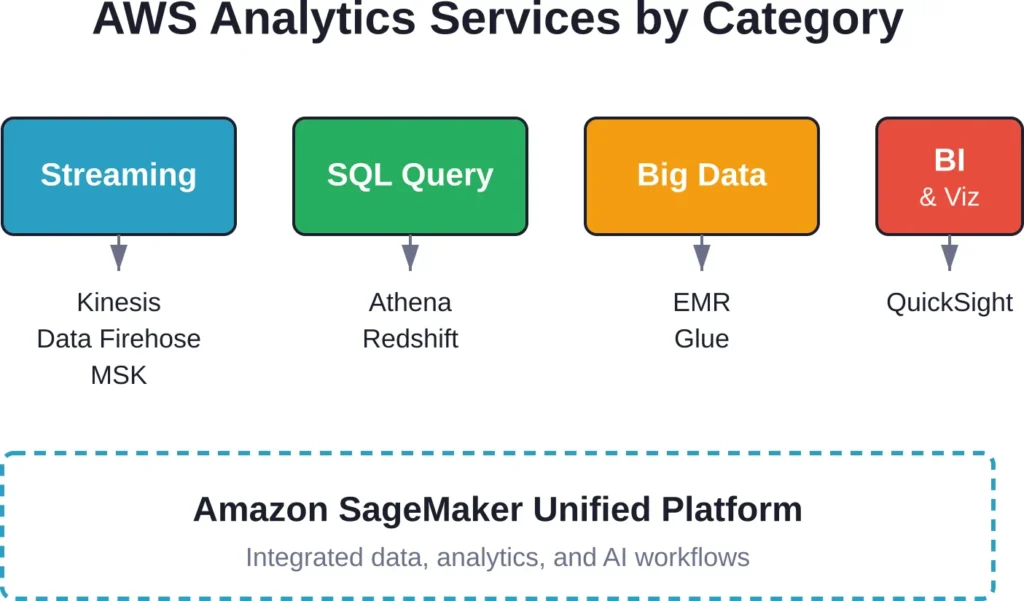
AWS Analytics Services provide the enterprise infrastructure layer. Data engineers and technical teams use services like Athena to query data lakes, Redshift for data warehousing, EMR for big data processing, Kinesis for real-time streaming, and QuickSight for business intelligence. These are powerful building blocks that require technical expertise.
The overlap is minimal. An AWS data architect isn’t shopping for PPC optimization software. A solo seller doing $50K monthly on Amazon won’t provision EMR clusters or Redshift warehouses.
In this guide we start with the tools most Amazon sellers need first, then move to the powerful AWS infrastructure layer that large brands eventually adopt.
Third-Party Amazon Marketplace Analytics Tools
Now we shift to the completely different category: tools built specifically for Amazon sellers and vendors to analyze marketplace performance.
These platforms don’t process AWS infrastructure data. They track product rankings, advertising metrics, competitor prices, keyword performance, inventory levels, and profitability at the SKU level. If you sell products on Amazon.com, these are the analytics tools that matter.
WisePPC: Advertising Analytics Tools

WisePPC is a specialized tool focused on Amazon PPC optimization and advertising performance analytics. It connects directly to Amazon Advertising API and provides deep insights into Sponsored Products, Sponsored Brands, and Sponsored Display campaigns.
The platform stands out with automated campaign structure recommendations, keyword harvesting, bid optimization rules, and detailed profitability analysis of every advertising dollar spent. Sellers particularly value its clean interface for identifying wasteful spend, uncovering high-ROI keywords, and scaling profitable campaigns faster.
WisePPC is especially useful for sellers who run large advertising portfolios and want to move beyond manual optimization in Amazon Ads Console. Like other tools in this category, it works best when combined with accurate cost data and a clear advertising strategy.
Contact Information:
- Website: wiseppc.com
- Facebook: www.facebook.com/people/Wise-PPC/61573154427547
- LinkedIn: www.linkedin.com/company/wiseppc
- Instagram: www.instagram.com/wiseppc
Seller Central: The Free Foundation

Consider what Amazon provides natively. Seller Central includes comprehensive reporting capabilities at no additional cost.
The Business Reports section tracks unit sessions, conversion rates, page views, and Buy Box percentage. Sales reports break down revenue by SKU, date, and fulfillment channel. Payment reports detail transaction fees, refunds, and settlements.
The data is 100% first-party accurate because it comes directly from Amazon. No estimation, no sampling. And the seamless integration into Seller Central eliminates login hassles.
But Seller Central reports have limitations. Data exports require manual downloads. Cross-referencing advertising spend with organic sales requires spreadsheet gymnastics. Competitive intelligence is nonexistent—you can’t see what competitors are doing.
This is why third-party tools exist. They enhance, aggregate, and contextualize data that Seller Central provides only in raw form.
Sellerboard: Profit Analytics Tools

Understanding true profitability on Amazon requires tracking more than gross sales. Amazon fees, advertising costs, cost of goods, storage fees, and returns all erode margins.
Sellerboard specializes in SKU-level profit tracking. Community discussions mention $19/month pricing, though check the official site for current rates. The platform connects to Seller Central and Advertising APIs, pulling real-time data to calculate net profit after all Amazon fees and ad spend.
Key differentiators include automated inventory valuation adjustments, lifetime value calculations by customer cohort, and PPC profitability broken down by campaign and keyword. For brands managing dozens of SKUs with complex cost structures, this level of granularity matters.
But profit tools only work if you accurately input COGS and other non-Amazon expenses. Garbage in, garbage out. The tool provides infrastructure; business owners provide accurate cost data.
Jungle Scout: Product Research and Market Intelligence

Jungle Scout pioneered Amazon product research tools and remains one of the strongest platforms for product discovery. Multiple pricing tiers are available—verify current pricing on the official Jungle Scout website.
The platform’s database contains historical sales estimates, review counts, seller types, and pricing trends for millions of ASINs. Users search by category, estimated revenue, competition level, and seasonality patterns to identify product opportunities.
Jungle Scout’s Opportunity Finder algorithm analyzes market gaps—categories with high demand but relatively low competition. The tool doesn’t make decisions for you, but it surfaces data patterns that would take weeks to uncover manually.
Limitations? Sales estimates are modeled, not reported. Jungle Scout uses Amazon’s Best Seller Rank combined with proprietary algorithms to estimate unit sales. The estimates are directionally accurate but not precise. Treat them as signals, not facts.
Helium 10: Keyword Research and SEO Optimization

Helium 10 offers deep keyword research capabilities alongside a broader suite of seller tools. Multiple pricing tiers are available—verify current pricing on the official Helium 10 website. Verify current pricing and plan details on the official site.
The platform’s Magnet tool generates thousands of relevant keyword suggestions based on a seed keyword. Cerebro reverse-engineers competitor listings to identify which keywords they rank for. Index Checker verifies whether Amazon’s algorithm actually indexes your listings for target keywords.
Keyword tools matter because Amazon’s A9/A10 algorithm determines product visibility. Ranking on page one for high-volume keywords directly impacts organic sales. Helium 10 provides the data to optimize listings and track ranking improvements over time.
But keyword optimization has limits. A perfectly optimized listing can’t overcome a product nobody wants or a price 50% above competitors. Keywords drive traffic; product-market fit drives conversions.
SmartScout: Market and Competitive Intelligence

SmartScout focuses on category-level market intelligence rather than individual product tracking. SmartScout offers multiple pricing tiers—verify current pricing on the official website. The platform maps brand revenue estimates, niche saturation levels, and competitive intensity across Amazon’s catalog.
For brands considering category expansion or acquisition targets, SmartScout provides macro-level insights. Which sub-categories are growing fastest? Which brands dominate specific niches? Where are white space opportunities?
This differs from product research tools like Jungle Scout. SmartScout analyzes markets and brands; Jungle Scout analyzes individual products. Both matter, but for different strategic questions.
AWS Analytics Services: The Enterprise Infrastructure Layer
AWS analytics services form the technical foundation for organizations processing massive datasets. As of April 29, 2026, the official AWS website organizes these capabilities into distinct categories, each optimized for specific workload types.
Streaming Data Services
Real-time data processing requires specialized infrastructure. AWS offers four primary services for building, scaling, and operating streaming pipelines without managing servers:
Amazon Kinesis collects, processes, and analyzes real-time streaming data. Think clickstream analytics, application logs, or IoT telemetry. Data arrives continuously, and Kinesis scales automatically to handle throughput spikes.
Amazon Data Firehose (formerly Kinesis Data Firehose) simplifies streaming ETL. It captures, transforms, and loads streaming data into data lakes, data stores, and analytics services. No code required for basic transformations—just point it at your destination.
Amazon Managed Service for Apache Flink runs Apache Flink applications without managing clusters. For teams with existing Flink workloads or complex stateful stream processing requirements, this managed service handles the infrastructure complexity.
Amazon MSK (Managed Streaming for Apache Kafka) provides fully managed Apache Kafka clusters. Organizations with Kafka expertise or existing Kafka-based architectures get AWS-managed infrastructure without replatforming.
Interactive SQL and Query Services
Not all analytics requires complex data pipelines. Sometimes you just need to run SQL against data sitting in S3.
Amazon Athena lets you query data directly in Amazon S3 using standard SQL. No servers to manage, no data to load. Pay per query, stop when you’re done. According to AWS documentation, Athena works best for ad-hoc analysis, log analytics, and interactive queries against structured and semi-structured data.
Athena integrates with AWS Glue Data Catalog for metadata management. Define your schema once, query it everywhere. The service handles JSON, Parquet, ORC, and other formats natively.
When should you use Athena? The official AWS documentation compares it with other analytics services. Athena excels when data already lives in S3, queries are intermittent rather than continuous, and you want to avoid managing query infrastructure.
Data Warehousing with Amazon Redshift
Amazon Redshift is a fully managed, petabyte-scale data warehouse built for high-performance SQL analytics against structured data. Unlike Athena’s serverless model, Redshift provisions clusters—groups of nodes that store data and execute queries.
The performance difference shows in workload type. Redshift optimizes for complex queries against large datasets with frequent access patterns. Columnar storage, advanced compression, and parallel processing deliver sub-second response times on multi-terabyte tables.
Recent enhancements include simplified OLAP queries using ROLLUP, CUBE, and GROUPING SETS operators. As documented in AWS blogs from February 2023, these SQL extensions perform multiple aggregate operations in a single statement—calculating subtotals, totals, and collections of subtotals without writing multiple queries.
Redshift also introduced RA3 node types with managed storage. Compute and storage scale independently, which means you can resize clusters based on query performance needs without worrying about storage capacity limits.
Big Data Processing with Amazon EMR
Amazon EMR (Elastic MapReduce) runs big data frameworks like Apache Spark, Hadoop, Presto, and HBase on AWS infrastructure. Data engineers use EMR for large-scale data transformation, machine learning pipelines, and batch processing workflows.
EMR supports multiple deployment options. EMR Serverless automatically provisions and scales resources based on workload demands. EMR on EC2 gives full control over cluster configuration. EMR on EKS runs Spark jobs on existing Kubernetes clusters.
According to an October 2025 AWS blog post, EMR integrates with Amazon SageMaker Unified Studio and Amazon SageMaker Catalog for data lineage visualization. Teams can track data transformations across EMR jobs, AWS Glue workflows, and Redshift pipelines through a unified interface.
Business Intelligence with Amazon QuickSight
Amazon QuickSight delivers serverless business intelligence with embedded machine learning insights. Connect to dozens of data sources, build interactive dashboards, and share visualizations across your organization.
But here’s where pricing gets interesting. QuickSight underwent significant restructuring in October 2025. The service evolved into “Amazon Quick Suite” with revised tiers and pricing:
- Author Pro: $40/month (reduced from $50), includes Quick Suite Enterprise capabilities
- Reader Pro: $20/month, includes Quick Suite Professional capabilities
- Author: $24/month (unchanged)
- Reader: $3 (unchanged), now includes ability to pin metrics to home page
The $250/month infrastructure fee continues to apply only to accounts with Pro tier users. Standard and Author tiers avoid this fee entirely.
QuickSight’s SPICE (Super-fast, Parallel, In-memory Calculation Engine) accelerates dashboard performance. The Standard Edition includes 10 GB of SPICE capacity included; additional capacity pricing should be verified on the official AWS pricing page. Enterprise Edition pricing varies—check the official site for current rates.
Natural language query capabilities documented as of July 2025 let business users ask questions like “Which region has the highest revenue?” and receive SQL-generated answers. The system automatically generates queries, executes them against connected data sources, and delivers results or narrative summaries.
Data Governance with Amazon DataZone
Amazon DataZone manages data governance, catalog, and access control across AWS analytics services. Create business data catalogs, define data domains, and manage access policies through a unified interface.
DataZone integrates with SageMaker Unified Studio for lineage tracking. Configuration parameters published in October 2025 documentation include settings for private subnets, VPC CIDR blocks, and user role definitions. Teams building multi-account analytics environments use DataZone to govern data sharing between organizational units.
The Next Generation of Amazon SageMaker
AWS announced the next generation of Amazon SageMaker on December 3, 2024—repositioning it as a unified platform for data, analytics, and AI rather than just machine learning infrastructure.
The current Amazon SageMaker was renamed to “Amazon SageMaker AI” and remains available as a standalone service for ML-focused workloads. The next-generation SageMaker now includes components for data exploration, preparation, integration, big data processing, fast SQL analytics, ML model development, and generative AI application development.
This matters because it changes how organizations approach analytics architecture. Instead of stitching together Athena, EMR, Glue, Redshift, and SageMaker AI separately, teams can now use a single integrated experience with Amazon Q and Amazon SageMaker Catalog embedded throughout.
Whether this integrated approach becomes the default remains to be seen. Many organizations prefer purpose-built services that excel at specific workloads. But for teams starting fresh or seeking unified governance, the next-generation SageMaker offers a streamlined entry point.
Choosing the Right AWS Analytics Service
AWS documentation last updated September 24, 2025 provides a decision guide for selecting analytics services. The guide breaks down data silos (connecting data lakes and data warehouses), system silos (connecting ML and analytics), and people silos (democratizing data access).
Here’s the practical breakdown:
| Use Case | Best Fit Service | Why It Works |
|---|---|---|
| Ad-hoc SQL queries on S3 data | Amazon Athena | Serverless, pay-per-query, no infrastructure management |
| High-performance data warehouse | Amazon Redshift | Columnar storage, complex query optimization, predictable workloads |
| Real-time data pipelines | Kinesis or MSK | Stream processing, sub-second latency requirements |
| Big data transformation jobs | Amazon EMR | Spark/Hadoop ecosystems, batch processing at scale |
| Business user dashboards | Amazon QuickSight | Low-code BI, embedded ML insights, natural language queries |
| Unified data + analytics + AI | Next-gen SageMaker | Integrated experience, embedded governance, single interface |
The choice isn’t always either/or. Modern data architectures combine multiple services. Data lands in S3, Athena handles exploratory queries, EMR runs transformation jobs, results flow into Redshift for structured analytics, and QuickSight visualizes everything for business stakeholders.
AWS calls this the “modern data architecture”—breaking down silos by connecting data lakes and specialized data stores rather than forcing everything into a single monolithic system.
Integrating AWS and Marketplace Analytics
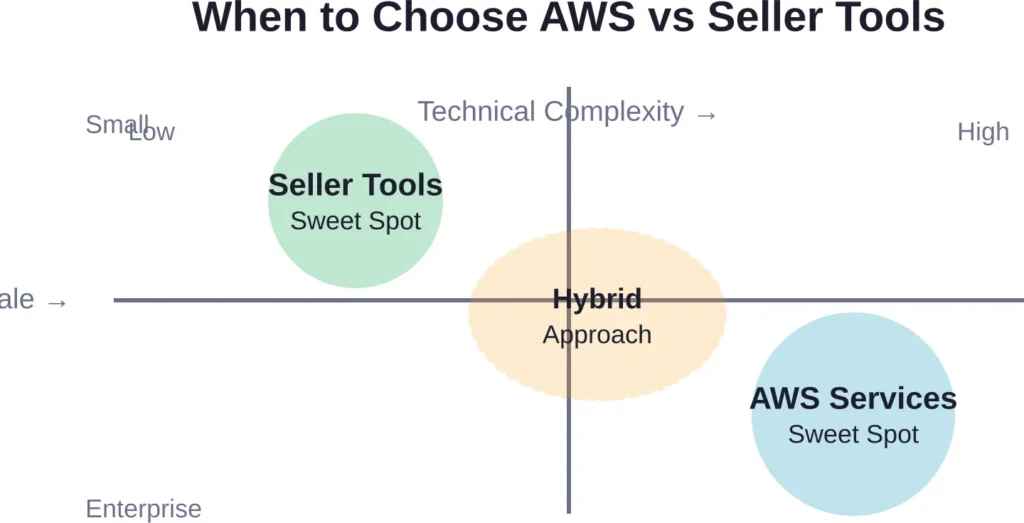
For large brands and aggregators, the two categories converge. A multi-brand seller managing $10M+ annual GMV might use AWS services to centralize data from Amazon APIs, 3PL systems, accounting software, and customer service platforms.
The architecture typically looks like this: Amazon SP-API and Advertising API data flows into S3 via scheduled Lambda functions or Data Firehose streams. AWS Glue runs ETL jobs to clean and transform raw API responses. Athena or Redshift provides the query layer. QuickSight or Tableau builds dashboards for executive reporting.
This approach gives full control over data models, custom metrics, and multi-source attribution. But it requires technical resources. Setting up and maintaining data pipelines demands engineering expertise that most small sellers don’t have and can’t justify.
The decision point? If seller analytics tools provide 80% of needed insights at $200/month, building custom infrastructure at $10K+ setup cost plus ongoing engineering time makes no financial sense. But if proprietary data models and multi-platform integration create competitive advantages, investing in AWS infrastructure pays off.
Data Privacy and Compliance Considerations
Both AWS services and third-party seller tools handle sensitive business data. Privacy and security requirements matter, especially for brands operating in multiple jurisdictions.
AWS provides enterprise-grade security controls, compliance certifications (SOC 2, ISO 27001, GDPR, HIPAA where applicable), and infrastructure that meets stringent data residency requirements. Data stays in specified AWS regions unless explicitly configured otherwise.
Third-party seller tools vary widely in security maturity. Established platforms implement encryption, access controls, and regular security audits. Smaller tools might not. Before connecting any tool to Seller Central APIs, verify their security practices and data handling policies.
Amazon’s API authorization model uses granular permission scopes. Grant only the minimum necessary permissions. If a profit analytics tool only needs Orders and Fees data, don’t authorize access to Customer or Inventory endpoints.
Common Implementation Mistakes to Avoid
Organizations implementing analytics infrastructure—whether AWS services or seller tools—make predictable mistakes.
Tool sprawl is the first. Teams sign up for multiple overlapping platforms, paying for redundant capabilities. A seller using both Jungle Scout and Helium 10 for product research wastes money. Pick one that fits your workflow and use it consistently.
Data quality neglect undermines analytics value. If COGS data in your profit tracker is three months outdated, the profit calculations are fiction. Garbage in, garbage out applies universally. Analytics tools only work when fed accurate inputs.
Over-engineering hits technical teams building AWS architectures. Starting with a complex multi-service pipeline for 50 SKUs and 1,000 monthly orders is overkill. Begin simple—maybe just Athena queries against S3 exports—and add complexity only when simpler solutions become bottlenecks.
Under-investing in training means expensive tools sit unused. Buying a $500/month analytics platform and never training team members to use it wastes money. Tools provide capabilities; trained users deliver results.
Future Trends in Amazon Analytics (2026 and Beyond)
The analytics landscape continues evolving rapidly. Several trends shape what’s coming:
AI-powered insights are moving from experimental to mainstream. QuickSight’s natural language query capability (launched July 2025) represents the early wave. Expect more “ask a question, get an answer” interfaces that abstract away SQL complexity.
Real-time decisioning replaces batch reporting. Instead of analyzing yesterday’s advertising performance tomorrow morning, systems adjust bids in real-time based on conversion patterns emerging within the hour.
Multi-channel integration breaks down Amazon-only silos. Brands selling on Amazon, Walmart, Target, Shopify, and wholesale channels need unified analytics that attribute revenue and costs across all channels. Tools that aggregate cross-platform data will win.
Privacy regulation compliance becomes more complex as jurisdictions enact stricter data protection laws. Analytics platforms that bake compliance into their architecture by design (data residency controls, automated retention policies, consent management) gain advantages.
Vertical-specific analytics deliver deeper insights than horizontal platforms. A tool built specifically for supplement brands understands FDA compliance, subscription retention metrics, and ingredient cost volatility in ways generic seller tools don’t.
Comparing AWS vs Third-Party Analytics: Decision Framework
So which approach makes sense? Here’s the decision framework:
| Factor | AWS Analytics Services | Third-Party Seller Tools |
|---|---|---|
| Primary user persona | Data engineers, analysts, technical teams | Sellers, brand managers, operators |
| Main value proposition | Flexible infrastructure, unlimited customization | Pre-built insights, fast time-to-value |
| Technical expertise required | High (SQL, data modeling, cloud architecture) | Low to medium (varies by tool complexity) |
| Setup time | Weeks to months | Hours to days |
| Ongoing maintenance | Continuous (pipelines, schema evolution, cost optimization) | Minimal (mostly data input validation) |
| Cost structure | Variable (storage + compute + query costs) | Fixed monthly subscription |
| Best for | Multi-source data integration, custom metrics, enterprise scale | Amazon-specific metrics, fast insights, SMB to mid-market |
The overlap case? Large organizations often use both. AWS infrastructure centralizes and transforms data. Third-party tools provide specialized analysis on top of that foundation. A brand might use Redshift as the data warehouse and feed cleaned data into custom Tableau dashboards while also using Jungle Scout for new product research.
Getting Started: Practical Next Steps
So you’ve read about dozens of analytics tools across two completely different categories. Now what?
Start by clarifying which problem you’re actually solving:
If you’re a seller or brand manager trying to understand product performance, ad efficiency, or profitability on Amazon Marketplace, start with Seller Central’s native reports. Use them for two weeks. Identify specific questions they can’t answer.
Then evaluate third-party tools that address those specific gaps. Need better profit tracking? Try Sellerboard. Want product research capabilities? Test Jungle Scout. Trying to improve keyword rankings? Explore Helium 10.
Most seller tools offer free trials. Use them. Import your real data. Answer real business questions. The tool that delivers actionable insights fastest wins.
If you’re a data engineer or technical leader building analytics infrastructure on AWS, start with the simplest service that solves your immediate need.
Need to query logs sitting in S3? Begin with Athena. No servers, no clusters, just SQL. If query performance becomes a bottleneck as data volume grows, graduate to Redshift.
Building real-time dashboards? Start with Kinesis Data Firehose streaming into S3, Athena for queries, and QuickSight for visualization. Add complexity (EMR transformations, Redshift data warehouse, custom ML models) only when simpler architectures hit limits.
AWS’s documentation includes reference architectures for common use cases. Follow proven patterns rather than inventing novel approaches—the reference architectures document best practices learned from thousands of customer implementations.
Frequently Asked Questions
AWS analytics services (Athena, Redshift, EMR, Kinesis, QuickSight) are cloud infrastructure components for processing large datasets—used by data engineers building custom analytics systems. Amazon seller analytics tools (Jungle Scout, Helium 10, Sellerboard) are specialized software for e-commerce operators tracking marketplace performance, product rankings, and advertising efficiency. The two categories serve different users solving different problems, though both are legitimately “Amazon analytics tools.”
As of October 2025, QuickSight pricing is: Reader at $3, Author at $24/month, Reader Pro at $20/month, and Author Pro at $40/month (reduced from $50). Accounts with Pro tier users pay a $250/month infrastructure fee. The Standard Edition previously offered $9/user/month annual subscriptions. Check the official AWS website for current pricing as tiers and costs change periodically.
Small businesses can absolutely use AWS analytics services—many are serverless and charge only for actual usage with no minimum fees. Athena charges per query executed, QuickSight Reader tier costs $3, and Data Firehose bills based on data volume processed. The barrier isn’t cost; it’s technical expertise. Small teams without data engineering resources might find third-party seller tools deliver faster value than building custom AWS infrastructure.
Seller Central’s native Business Reports provide the best starting point at zero cost. They cover sales, traffic, conversion rates, and Buy Box percentage with no learning curve. When ready to expand capabilities, profit trackers like Sellerboard offer relatively simple setup—connect your Seller Central account and input COGS to see real profitability metrics. Product research tools like Jungle Scout require more learning but deliver high value for those launching new products.
Most sellers don’t need both. Third-party tools provide sufficient analytics for brands doing under $5-10M annual revenue on Amazon. AWS infrastructure makes sense when you’re integrating data from multiple platforms (Amazon, Walmart, Shopify, ERP systems), building proprietary metrics competitors can’t replicate, or operating at enterprise scale where custom infrastructure costs less than paying per-user fees for commercial tools. The overlap use case is large organizations using AWS for data warehousing and transformation while also licensing specialized tools for specific analysis types.
AWS services don’t automatically connect to Seller Central—you must build the integration using Amazon’s SP-API (Selling Partner API). Typically, scheduled AWS Lambda functions call SP-API endpoints to retrieve orders, inventory, fees, and advertising data, then write responses to S3. From there, services like Athena, Glue, Redshift, and QuickSight can process and analyze the data. This requires development work; third-party seller tools handle API integration automatically during setup.
Sales estimates from tools like Jungle Scout and Helium 10 are modeled approximations, not reported facts. They use Amazon’s Best Seller Rank combined with proprietary algorithms to estimate unit velocity. The estimates are directionally accurate—useful for comparing relative opportunity size between products—but not precise enough for financial forecasting. Treat them as market signals for product research, not ground truth for business planning.
Conclusion: Choose Tools That Match Your Analytics Maturity
The “list of Amazon data analytics tools” splits into two distinct universes: AWS’s enterprise infrastructure services and Amazon marketplace seller tools. Recognizing which category matches your needs eliminates confusion.
AWS analytics services—Athena, Redshift, EMR, Kinesis, QuickSight, and the next-generation SageMaker platform—provide building blocks for organizations processing massive datasets across multiple sources. These services deliver unlimited customization at the cost of technical complexity.
Third-party seller tools—Jungle Scout, Helium 10, Sellerboard, SmartScout, and dozens more—offer pre-built insights specifically for Amazon marketplace performance. They optimize for fast time-to-value with minimal technical expertise required.
The best tool for your situation depends on your analytics maturity, technical resources, data integration requirements, and business scale. Small to mid-size sellers typically achieve better ROI from specialized tools. Large brands and aggregators eventually justify custom AWS infrastructure for competitive advantages.
Start simple. Use Seller Central’s native reports or one targeted third-party tool. Expand capabilities as specific gaps emerge. Analytics infrastructure should solve real problems, not demonstrate technical sophistication.
The data exists. The tools exist. What matters now is using them to make better decisions—whether that’s optimizing ad spend on a top-selling SKU or architecting a multi-petabyte data lake that powers machine learning models.
Ready to upgrade your Amazon analytics capabilities? Assess which category of tools addresses your current bottleneck, test the leading options in that category, and implement the one that delivers actionable insights fastest. Data without action is just noise.