

Quick Summary: Amazon sellers in 2026 need a streamlined toolkit spanning product research, listing optimization, inventory management, profit analytics, and advertising. The essential tools include WisePPC, Jungle Scout or Helium 10 for product research, PickFu for listing testing, Seller Central’s native analytics, Sellerboard or similar for profit tracking, and Veeqo for multichannel shipping—all supported by free resources like Keepa and Amazon’s FBA Revenue Calculator.
Running an Amazon business in 2026 means juggling product research, inventory, advertising, customer service, and profit calculations—all at once. The sheer volume of seller tools out there promises to simplify every task, but most sellers end up paying for features they don’t use while missing the data that actually moves the needle.
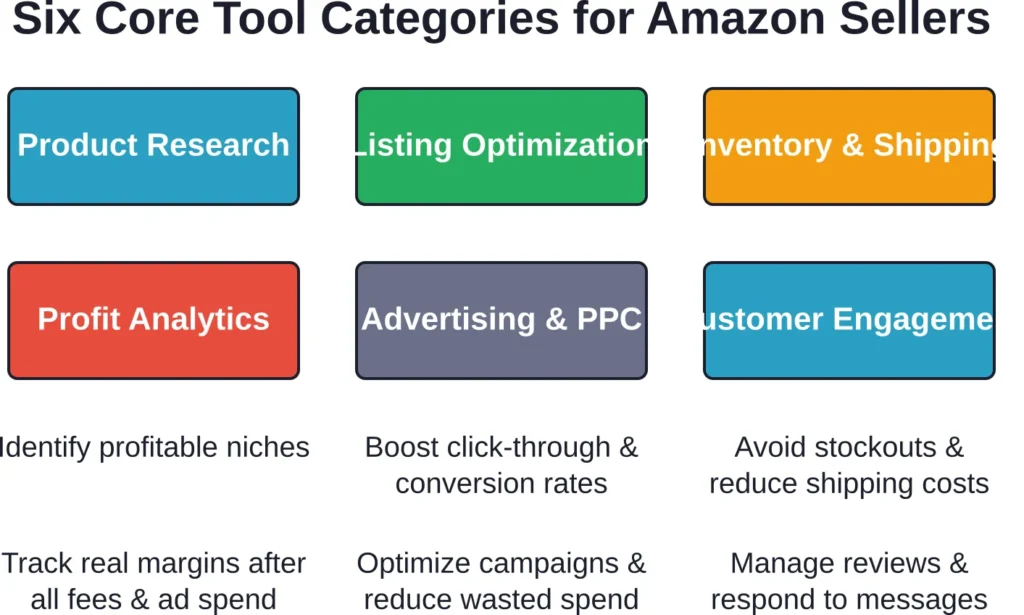
Here’s the thing though—tool fatigue is real. According to industry analyses, 34% cite rising COGS as a top concern, 32% cite growing ad expenses, and subscription bloat only makes margins tighter. The goal isn’t to collect every tool on the market. It’s to build a lean, effective stack that covers the six core functions every seller needs.
This guide breaks down the essential Amazon seller tools by category, highlights what each one actually does, and helps identify which pieces matter most for your business model. No fluff, no affiliate-driven lists—just honest picks based on what works in 2026.
Why the Right Amazon Seller Tools Matter
Amazon’s marketplace has evolved into a data-intensive battlefield. With 75% of traffic to Amazon’s seller platform originates from phones or tablets, sellers need tools that deliver insights fast and work across platforms. The difference between profitable sellers and those spinning wheels often comes down to decision speed—and the right software stack accelerates that.
The problem isn’t a shortage of options. It’s the opposite. Hundreds of tools compete for subscription dollars, and most “best of” roundups recycle the same names without addressing a fundamental question: which category of tool delivers the highest ROI for your current stage?
Data shows that advanced tool users see a 32% increase in profitability compared to baseline sellers. But that advantage doesn’t come from using everything—it comes from deploying the right tools in the right sequence.
Advertising and PPC Tools: Optimizing Ad Spend
Amazon Advertising drives visibility, but unoptimized campaigns burn budget fast. Sellers face increasing ad costs—32% cite growing ad expenses as a top challenge in 2026. PPC tools automate bid adjustments, surface wasted spend, and identify high-converting keywords.
WisePPC

WisePPC is a powerful Amazon Advertising management platform and official Amazon Ads Verified Partner. It stands out with deep historical data storage (far beyond Amazon’s 60–90 day limit), bulk operations on thousands of campaigns, advanced analytics (ACoS, TACoS, ROAS, profitability by keyword/ASIN), real-time monitoring, and smart automation rules. Its clean interface and inline editing make it especially popular among mid-to-large sellers who need professional-grade PPC optimization without complexity.
Contact Information:
- Website: wiseppc.com
- Facebook: www.facebook.com/people/Wise-PPC/61573154427547
- LinkedIn: www.linkedin.com/company/wiseppc
- Instagram: www.instagram.com/wiseppc
Helium 10 Adtomic

Adtomic, part of Helium 10’s suite, automates Amazon PPC campaigns with rule-based bid adjustments and negative keyword harvesting. It’s included in higher Helium 10 subscription tiers, making it a value-add for sellers already using the platform for research and optimization.
Seller Central’s Campaign Manager

Amazon’s native Campaign Manager offers Sponsored Products, Sponsored Brands, and Sponsored Display ads at no additional software cost. While it lacks the automation of third-party tools, it provides full control and real-time data.
For sellers just starting with PPC, Campaign Manager is sufficient. As ad spend scales, automation tools become cost-effective.
Product Research Tools: Finding What Sells
Product research is where every successful Amazon business starts. The right tool in this category reveals demand, competition levels, pricing trends, and supplier opportunities—before spending a dime on inventory.
Jungle Scout

Jungle Scout remains one of the most trusted names in product research. It offers supplier discovery, sales estimates, keyword tracking, and competitive analysis in a single platform. Pricing starts at $49/month, with higher tiers unlocking deeper analytics and automation features.
The tool shines for sellers launching new products or expanding into new categories. Sales data comes from Amazon’s API combined with proprietary algorithms, delivering reasonably accurate demand forecasts.
Helium 10
Helium 10 bundles product research with keyword discovery, listing optimization, and PPC management. It’s a Swiss Army knife for sellers who want multiple functions under one roof. Pricing ranges from approximately $39/month for the Starter plan to higher tiers.
The platform includes Black Box for product discovery, Cerebro for reverse ASIN keyword research, and Magnet for keyword generation. The breadth of features makes it appealing, but many sellers pay for tools they rarely touch.
SmartScout

SmartScout focuses on brand and category intelligence, making it ideal for sellers who want to understand market structure before diving into product details. Pricing starts at $25/month. It’s particularly useful for wholesale and private-label sellers analyzing competitive landscapes.
Listing Optimization Tools: Converting Browsers into Buyers
Product listings are the storefront. Optimization tools in this category focus on improving click-through rates, conversion rates, and keyword relevance—three levers that directly impact sales velocity.
PickFu

PickFu delivers rapid consumer feedback on product images, titles, and bullet points through split-test polls. According to BrightLocal (2021), 79% of consumers trust online reviews similarly to personal recommendations, and listing elements that resonate with real shoppers directly influence click-through rates.
PickFu polls return results in hours, not days. Sellers can test two product images, compare title variations, or validate packaging design before committing to inventory. The service operates on a pay-per-poll model rather than a monthly subscription.
Amazon’s A+ Content and Brand Registry
Amazon’s native Brand Registry unlocks A+ Content (formerly Enhanced Brand Content), which allows rich media, comparison charts, and storytelling modules in product descriptions. There’s no additional cost beyond the trademark registration required for Brand Registry.
A+ Content consistently drives higher conversion rates. It’s not a third-party tool, but it’s essential—and free once registered.
Inventory and Shipping Tools: Keeping Stock Moving
Inventory mismanagement kills margins. Stockouts lose the Buy Box and tank organic rank. Overstocking ties up capital and racks up long-term storage fees. The right tools in this category balance supply with demand in real time.
Veeqo

Veeqo is Amazon’s free multichannel shipping software. It consolidates inventory across marketplaces, offers discounted shipping rates, and automates picking and packing workflows. Sellers can earn up to 5% back on eligible shipments, which offsets logistics costs over time.
The software integrates with Seller Central, Shopify, eBay, and other platforms, making it a solid choice for sellers managing multiple sales channels. And again—it’s free.
InventoryLab

InventoryLab connects to Amazon Professional seller accounts and provides inventory tracking, cost-of-goods-sold calculations, and shipment planning. It’s particularly popular among FBA sellers who need granular control over inventory batches and landed costs.
Pricing varies based on sales volume, but the platform focuses on profitability tracking alongside inventory—making it a hybrid between inventory management and profit analytics.
Profit Analytics Tools: Knowing What You Actually Earn
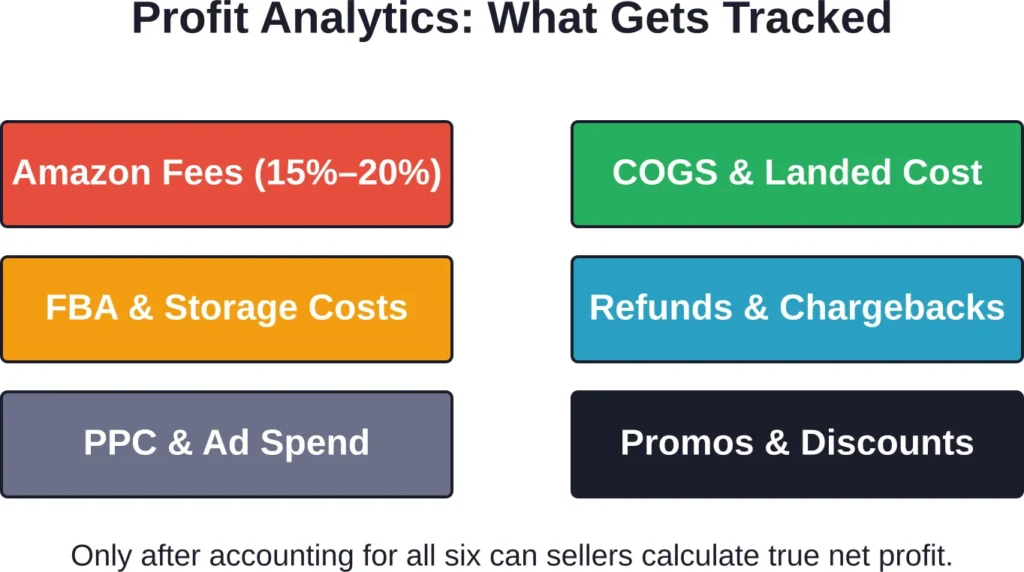
Revenue numbers mean nothing without understanding true profit. Amazon’s fee structure is complex—referral fees, FBA fees, storage fees, advertising costs, refunds, and chargebacks all erode gross sales. Profit analytics tools cut through the noise.
Sellerboard

Sellerboard tracks profit and loss in real time, accounting for all Amazon fees, PPC spend, cost of goods, and refunds. Pricing starts at $19/month, making it one of the most affordable dedicated profit trackers.
The dashboard displays net profit per product, per day, and per campaign. Sellers can identify which ASINs drain margin and which drive the bulk of earnings—critical data for inventory decisions.
Analyzer.Tools
Analyzer.Tools offers bulk ASIN analysis and profit calculation. The platform provides paid tiers available. Short-term passes available for sellers who need periodic deep dives rather than continuous monitoring.
The tool excels at portfolio analysis—comparing dozens or hundreds of products side by side to surface patterns in profitability, competition, and demand.
Free Tools Every Amazon Seller Should Use
Not every essential tool requires a subscription. Amazon and third-party developers offer free resources that cover critical functions—especially valuable for new sellers operating on tight budgets.
Amazon Seller Central Hub
Seller Central is the command center. It tracks account health, sales performance, customer messages, returns, and policy compliance. Every seller has access—it’s included with a Professional seller account at $39.99/month (or the Individual plan at $0.99 per item sold).
The Business Reports section provides sales trends, traffic data, and conversion metrics. The Performance dashboard flags policy violations before they escalate. It’s not glamorous, but it’s indispensable.
Amazon Seller App
The Amazon Seller mobile app puts business management in your pocket. Sellers can scan barcodes for instant product research, list new items, respond to customer messages, and monitor sales—all from a smartphone.
The app includes a built-in Photo Studio for transforming product photos into listing-ready images. With 75% of platform traffic coming from phones or tablets, managing your business on the go isn’t optional anymore.
Keepa

Keepa tracks price history, sales rank trends, and Buy Box ownership for any Amazon ASIN. The free browser extension displays historical charts directly on product pages, helping sellers identify pricing patterns, seasonal demand, and competitive moves.
The paid version unlocks additional data points and API access, but the free tier covers most seller needs.
Amazon’s FBA Revenue Calculator
The FBA Revenue Calculator estimates fees, shipping costs, and net proceeds for any product. Sellers input dimensions, weight, and price; the calculator returns a breakdown of referral fees, FBA fees, and estimated profit.
It’s a quick validation tool before committing to a product. No signup required—completely free.
Building Your Stack: Which Tools to Prioritize
The best stack isn’t the longest one. It’s the combination that covers your six core categories without redundancy or wasted spend. Here’s how to prioritize based on business stage.
| Seller Stage | Must-Have Tools | Nice-to-Have Tools |
|---|---|---|
| New Seller (0–10 SKUs) | Seller Central, FBA Calculator, Keepa, Amazon Seller App | Jungle Scout (Starter), PickFu (occasional polls) |
| Growing Seller (10–50 SKUs) | Jungle Scout or Helium 10, Sellerboard, Veeqo, Keepa | PickFu, InventoryLab, Campaign Manager automation |
| Established Seller (50+ SKUs) | Helium 10 (full suite), Sellerboard or Analyzer.Tools, Veeqo, PPC automation | SmartScout, Adtomic, third-party review tools |
| Multi-Channel Seller | Veeqo, multichannel inventory platform, Helium 10, profit tracker | Channel-specific analytics, unified dashboard tools |
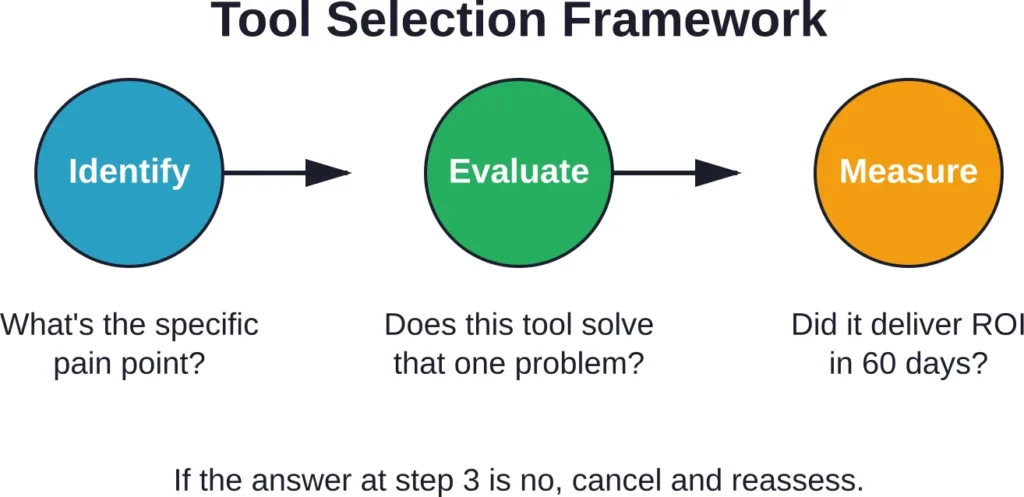
Start with free tools and Seller Central’s native features. Add paid tools only when a specific pain point justifies the cost. A lean stack of three to five tools often outperforms a bloated roster of ten.
Common Mistakes When Choosing Seller Tools
Sellers fall into predictable traps when assembling their toolkit. Avoiding these saves both money and frustration.
Paying for Overlapping Features
Many platforms bundle product research, keyword tracking, and PPC management. Subscribing to two tools that both offer keyword research means paying twice for the same data. Audit your stack quarterly and eliminate redundancies.
Ignoring Free Alternatives
Seller Central’s Business Reports, the FBA Revenue Calculator, and the Seller App cover substantial ground at no cost. New sellers often jump to premium tools before exhausting free options.
Chasing Features Instead of Outcomes
A tool with fifty features sounds impressive, but if you only use three of them, the subscription isn’t justified. Focus on solving specific problems—stockouts, low conversion rates, wasted ad spend—and choose tools designed for those outcomes.
Skipping Trials and Demos
Most platforms offer free trials or money-back guarantees. Test tools with real data from your account before committing to annual plans. A tool that works for one seller might not fit another’s workflow.
How Amazon’s Native Tools Stack Up
Amazon provides a surprising amount of functionality at no additional cost beyond the Professional seller account fee. Seller Central, Brand Registry, the Seller App, and various reporting dashboards handle core tasks that third-party tools often replicate.
Seller Central’s Business Reports track traffic, conversion rates, and sales trends. The Advertising Console manages PPC campaigns. The Inventory Dashboard flags low stock and excess inventory. For new sellers, these native tools often suffice for the first six to twelve months.
The limitations emerge at scale. Seller Central doesn’t calculate true net profit after all fees. It doesn’t automate PPC bid adjustments. It doesn’t provide competitor keyword analysis or demand forecasts. That’s where third-party tools fill gaps—but only when those gaps actually hurt performance.
Integrating Tools into Daily Workflow
Buying tools is easy. Using them consistently is harder. Successful sellers build tools into daily, weekly, and monthly routines rather than letting subscriptions sit idle.
A typical workflow might look like this:
- Daily: Check Seller Central for messages, orders, and account health. Review Sellerboard or similar for yesterday’s profit snapshot.
- Weekly: Analyze PPC performance in Campaign Manager or Adtomic. Adjust bids on underperforming keywords. Review inventory levels in Veeqo and reorder as needed.
- Monthly: Run product research in Jungle Scout or Helium 10 to identify new opportunities. Test listing variations with PickFu. Review profit trends and eliminate low-margin ASINs.
The cadence matters. Tools deliver value when data informs action, not when dashboards collect dust.
What About Customer Engagement Tools?
Customer engagement—managing reviews, responding to questions, and handling negative feedback—often gets overlooked in tool discussions. Yet reviews directly impact conversion rates and organic rank.
Amazon’s Request a Review button (available in Seller Central) is the simplest, policy-compliant way to solicit feedback. Third-party tools like FeedbackWhiz and Helium 10’s Follow-Up automate review requests and track response rates, but Amazon’s policies around customer communication are strict. Any automation must comply with Terms of Service.
For most sellers, Seller Central’s native messaging and Request a Review feature cover the essentials. Advanced sellers managing hundreds of SKUs may benefit from automation, but manual outreach often performs just as well with lower compliance risk.
Tool Costs vs. Business Revenue: What’s Reasonable?
How much should sellers spend on software? Industry benchmarks suggest tools should consume no more than 2–5% of monthly revenue. A seller doing $10,000/month in sales should cap tool subscriptions around $200–$500.
That budget needs to cover product research, profit tracking, inventory management, and advertising optimization. Prioritize tools that directly impact margin—profit analytics and PPC automation typically deliver the highest ROI.
Newer sellers often spend too much too early, subscribing to premium tiers before revenue justifies the cost. Start lean, measure results, and scale tool investment alongside revenue growth.
Frequently Asked Questions
Seller Central itself. It’s the hub for account health, sales data, customer messages, and policy compliance. Before adding third-party tools, new sellers should master Seller Central’s Business Reports, Inventory Dashboard, and Advertising Console. Once comfortable with native features, add product research (Jungle Scout or Helium 10) and profit tracking (Sellerboard) as the next priorities.
For the first few months, yes. Seller Central, the Amazon Seller App, Keepa, and the FBA Revenue Calculator cover product validation, inventory tracking, and basic analytics at no cost. As the catalog grows beyond ten to fifteen SKUs, paid tools for profit tracking and advanced product research become cost-effective investments that improve decision speed and margin visibility.
Measure ROI over sixty days. Track a specific metric the tool claims to improve—profit margin, conversion rate, ad spend efficiency, or inventory turnover. If that metric moves positively and the improvement exceeds the subscription cost, keep the tool. If not, cancel and reallocate budget. Most platforms offer free trials or money-back guarantees, making low-risk testing straightforward.
Both platforms overlap heavily in product research and keyword analysis, so subscribing to both simultaneously is usually redundant. Jungle Scout tends to focus more on product discovery and supplier sourcing, while Helium 10 offers broader functionality including listing optimization and PPC tools. Choose one based on which interface and feature set aligns better with workflow, then supplement with specialized tools for profit tracking or inventory management.
Amazon’s native Campaign Manager provides full campaign data and control at no extra cost. For sellers spending under $1,000/month on ads, Campaign Manager is typically sufficient. Beyond that threshold, automation tools like Helium 10’s Adtomic or standalone PPC platforms can optimize bids, harvest negative keywords, and reduce wasted spend—but only if the time saved or performance gain justifies the subscription.
Most major tools support multiple Amazon marketplaces—US, UK, Germany, Japan, and others. However, data quality and feature availability can vary by region. Check the tool’s documentation to confirm which marketplaces are fully supported. Helium 10, Jungle Scout, and Keepa all offer multi-marketplace functionality, though sellers should verify that the specific regions they operate in are covered before subscribing.
Quarterly audits work well for most sellers. Review which tools were actively used in the past ninety days, which features delivered measurable value, and which subscriptions went untouched. Cancel or downgrade anything that didn’t contribute to revenue, margin, or operational efficiency. Business needs shift as catalogs grow and strategies evolve, so tool stacks should adapt accordingly rather than accumulating perpetual subscriptions.
Conclusion: Build a Lean, Effective Toolkit
The essential Amazon seller tools in 2026 aren’t the ones with the longest feature lists or the flashiest dashboards. They’re the ones that solve specific, measurable problems—stockouts, wasted ad spend, unclear margins, poor listing performance—and deliver ROI within sixty days.
Start with Amazon’s free resources: Seller Central, the Seller App, the FBA Revenue Calculator, and Keepa. Add product research (Jungle Scout or Helium 10), profit tracking (Sellerboard or Analyzer.Tools), and multichannel shipping (Veeqo) as revenue and complexity grow. Test listing variations with PickFu. Optimize PPC with Campaign Manager or automation tools once ad spend justifies the investment.
The goal isn’t to collect every tool on the market. It’s to build a lean stack that covers the six core categories—product research, listing optimization, inventory management, profit analytics, advertising, and customer engagement—without redundancy or wasted spend.
Audit your stack quarterly. Cancel tools that don’t deliver measurable value. Reinvest saved budget into the ones that move the needle. And remember—data only matters when it informs action. The best toolkit is the one you actually use.