

Quick Summary: Revit is building information modeling (BIM) software developed by Autodesk for architects, engineers, and construction professionals to create intelligent 3D models of buildings and infrastructure. While Revit is a powerful BIM tool, it’s important to understand that BIM itself is a methodology and process—not software. Revit serves as one of several applications that enable BIM workflows, allowing teams to design, coordinate, and manage building projects through detailed digital models.
The construction industry faces a persistent confusion that trips up newcomers and experienced professionals alike: the relationship between Revit and BIM. Search for either term, and results often treat them as interchangeable. They’re not.
Understanding this distinction matters because it shapes how teams approach projects, invest in training, and build their technology stacks. Getting it wrong can lead to misaligned expectations and ineffective implementations.
So what exactly is Revit BIM? The term itself reflects the confusion—combining a specific software product with the broader methodology it supports. This guide clears up that confusion and explores how Revit functions as a BIM tool, what makes it different from other approaches, and why it’s become central to modern building design and construction.
Understanding BIM: The Methodology Behind the Technology
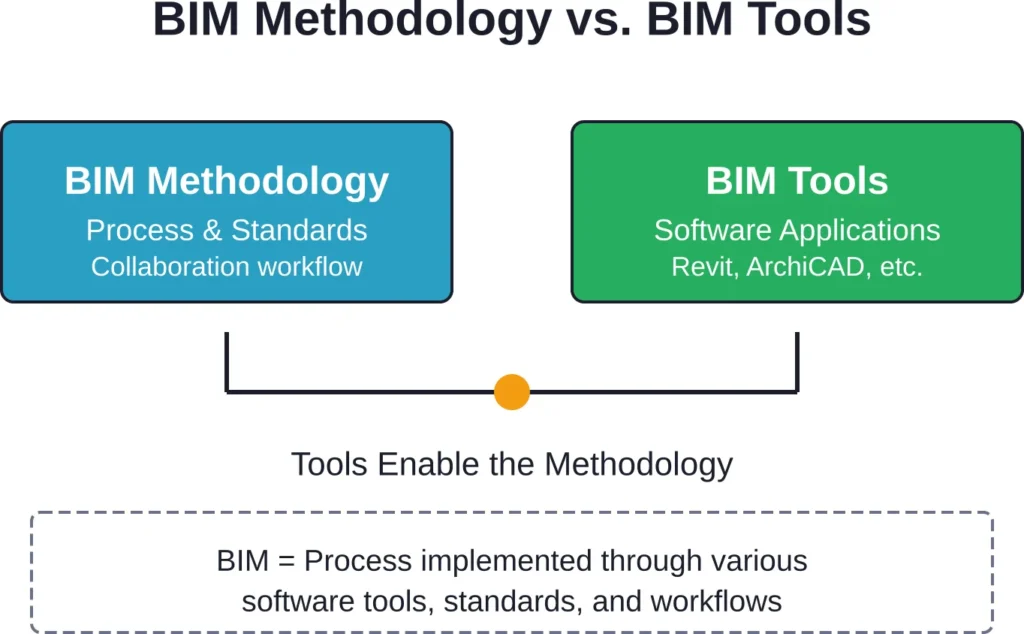
Building Information Modeling represents a fundamental shift in how the architecture, engineering, and construction industries approach projects. It’s not a piece of software—it’s a process.
According to buildingSMART International, the worldwide industry body driving digital transformation in the built asset industry, BIM enables standardized, digital descriptions of the built environment. These standards, including the Industry Foundation Classes (IFC) published as ISO 16739, provide machine interpretability of information and enable automation of workflows.
The BIM process involves creating and managing digital representations of physical and functional characteristics of buildings throughout their lifecycle. From initial concept through design, construction, operation, and eventual demolition, BIM methodology keeps all project information connected and accessible.
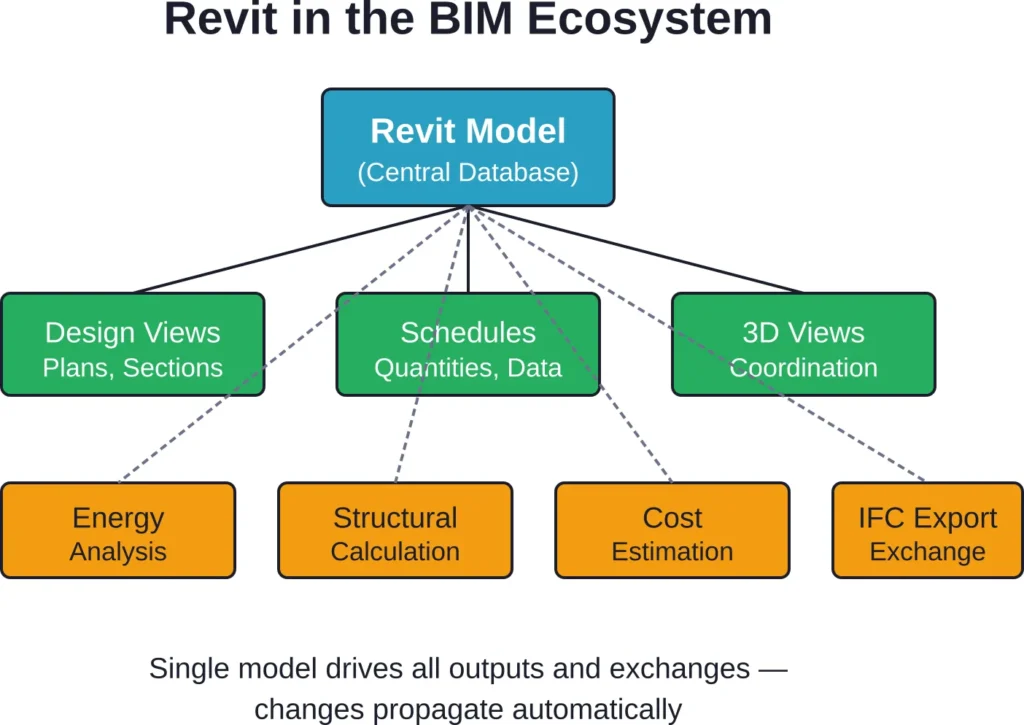
Here’s what makes BIM different from traditional CAD drafting: intelligence. BIM models contain rich data about every component—materials, costs, manufacturers, installation dates, maintenance schedules. Change a door specification, and the model updates schedules, cost estimates, and related documentation automatically.
The Core Principles of BIM Methodology
BIM operates on several foundational principles that distinguish it from older approaches:
- Collaboration across disciplines and project phases
- Single source of truth for all project information
- Intelligent objects with embedded data and behaviors
- Lifecycle management beyond just design and construction
- Interoperability between different software platforms
That last point—interoperability—is where standards like IFC and protocols like BCF (BIM Collaboration Format) become essential. BuildingSMART’s BCF standard enables efficient issue management and coordination across different BIM applications, whether through file-based exchange or web services.
What is Revit? The Software Tool Explained
Autodesk Revit is building information modeling software designed specifically for architects, structural engineers, MEP engineers, designers, and construction professionals. Released initially on April 5, 2000, Revit was developed by Revit Technology Corporation before Autodesk purchased the company for $133 million in 2002.
That acquisition allowed Autodesk to invest heavily in research, development, and improvement of the software. Today, Revit stands as one of the most widely adopted BIM applications in the architecture, engineering, and construction industries.
The software enables users to create, edit, and review detailed 3D models of buildings and infrastructure. But calling it “3D modeling software” undersells what Revit actually does. Each element in a Revit model—walls, doors, windows, structural beams, HVAC ducts, electrical fixtures—is an intelligent object with properties, relationships, and behaviors.
How Revit Works
Revit operates on a parametric modeling approach. Define a wall type once with specific materials, thickness, fire rating, and thermal properties. Place that wall anywhere in the model, and it carries all that information with it. Change the wall type definition, and every instance updates automatically.
This intelligence extends to relationships between elements. Move a wall, and the doors, windows, and fixtures hosted on it move too. Delete a room, and the associated area calculations update in real-time across all schedules and documentation.
The software organizes work into a single project file that multiple team members can access simultaneously through worksharing. Architects design the building form while structural engineers model the framing system and MEP engineers route building systems—all within coordinated models that highlight clashes and conflicts before construction begins.
Revit Disciplines and Specializations
Revit isn’t one monolithic application. It encompasses specialized toolsets for different disciplines:
| Discipline | Primary Focus | Key Features |
|---|---|---|
| Revit Architecture | Building design and documentation | Walls, roofs, stairs, rooms, renderings |
| Revit Structure | Structural engineering and analysis | Beams, columns, foundations, rebar, loads |
| Revit MEP | Mechanical, electrical, plumbing systems | Ducts, pipes, conduit, fixtures, calculations |
Modern Revit licenses typically include all three disciplines, allowing firms to work across specializations as needed.
The Relationship Between Revit and BIM
Now the connection becomes clearer. Revit is a tool that enables BIM methodology. It’s one of several applications—alongside ArchiCAD, Tekla, Bentley products, and others—that support BIM workflows.
But here’s where confusion enters: because Revit has become so dominant in many markets, especially North America, professionals sometimes use “doing BIM” as shorthand for “working in Revit.” That conflation obscures an important truth.
Teams can use Revit without truly implementing BIM methodology. Someone might model a building in Revit but export static PDFs for coordination, avoid linking disciplines, and never share the model with contractors or facility managers. They’re using a BIM tool, but they’re not doing BIM.
Conversely, organizations can implement BIM methodology using different software platforms. An architect might use ArchiCAD, a structural engineer Tekla, and a contractor Navisworks—all coordinating through IFC file exchange and BCF issue tracking. That’s BIM methodology without Revit.
Why the Distinction Matters
Understanding that Revit ≠ BIM has practical implications:
- Training programs should teach both software skills AND collaboration methodology
- Project specifications should define BIM requirements independently of specific tools
- Technology investments need to consider the full ecosystem, not just modeling software
- Hiring decisions should evaluate both technical proficiency and process understanding
Organizations that grasp this distinction make better strategic decisions about technology adoption and team development.
Key Features That Make Revit a BIM Tool
What capabilities does Revit offer that align with BIM methodology principles? Several features distinguish it from basic drafting or modeling software.
Parametric Components and Families
Revit’s family system allows creation of reusable, parametric building components. A door family might include dozens of size variations, hardware options, and material choices—all defined once and available throughout the project.
These families carry far more than geometry. They embed manufacturer data, cost information, energy performance characteristics, maintenance requirements, and custom parameters specific to organizational needs.
Bidirectional Associativity
Change something in a Revit model, and related views, sheets, schedules, and tags update automatically. This bidirectional relationship works both ways—edit a dimension in a floor plan, and the 3D model adjusts accordingly.
This capability eliminates the coordination nightmares common in traditional CAD workflows where plans, sections, elevations, and details exist as separate, manually coordinated drawings.
Worksharing and Collaboration
Revit’s worksharing functionality allows multiple team members to work in the same project file simultaneously. The software tracks element ownership, manages conflicts, and synchronizes changes across the team.
Combined with Autodesk’s BIM Collaborate Pro cloud services, teams can coordinate across offices, time zones, and organizations. Models stay synchronized, and everyone works from current information.
Interoperability and Standards Compliance
Revit supports industry-standard formats for BIM data exchange. It exports IFC files for coordination with other BIM applications, imports and exports BCF files for issue tracking, and links with analysis tools for energy modeling, structural calculations, and construction simulation.
This openness—while imperfect—enables the multi-platform collaboration that true BIM methodology requires. BuildingSMART International’s IFC standard, now at version 4.3.2.0, provides the common language that makes this exchange possible.
Get Revit BIM Support for Project Delivery
Revit BIM workflows help project teams manage design coordination, documentation, and model-based collaboration throughout project delivery. Powerkh supports Revit-based BIM projects with modelling, coordination, and technical documentation services.
Need Revit BIM Support?
Talk with Powerkh to:
- develop coordinated BIM models in Revit
- support project documentation workflows
- improve coordination before construction starts
- extend BIM delivery capacity when needed
Discuss your Revit BIM workflow requirements with Powerkh.
Who Uses Revit and How?
Different professionals leverage Revit’s capabilities in specialized ways. Understanding these use cases clarifies the software’s role across project phases.
Architects and Architectural Designers
Architects use Revit for conceptual design through construction documentation. The software handles space planning, building massing, detailed design development, rendering, and documentation production.
Architectural designers in the United States earn competitive salaries in the AEC industry, with compensation varying by experience and location. Revit proficiency has become virtually mandatory for these roles—job postings routinely list it as a required skill.
The architectural workflow in Revit typically progresses from conceptual masses through detailed building components, then to construction documents with plans, sections, elevations, details, and schedules all generated from the central model.
Structural Engineers
Structural engineers model framing systems, foundations, and structural elements in Revit Structure. The software connects to analysis applications like Robot Structural Analysis for load calculations and member sizing.
Structural models coordinate with architectural designs to identify conflicts between architectural features and structural requirements. Beam penetrations, column locations, foundation clearances—all these coordination points surface early in the design process rather than during construction.
MEP Engineers
Mechanical, electrical, and plumbing engineers use Revit MEP to design building systems. The software routes ductwork, piping, and conduit through buildings while checking for adequate clearances and identifying clashes with structure and architecture.
Revit’s calculation features support HVAC load analysis, electrical load distribution, and plumbing fixture unit calculations. Engineers can size equipment and distribution systems within the modeling environment.
Construction Professionals
Contractors and construction managers use Revit models for quantity takeoffs, construction sequencing, and coordination. The detailed model provides accurate material quantities for estimating and procurement.
Combined with scheduling software, Revit models support 4D construction simulation—visualizing how the building will be assembled over time and identifying logistical challenges before they occur on site.
BIM Specialists
BIM Specialists coordinate BIM models across disciplines to maintain accuracy and optimize efficiency. This role demands deep technical knowledge of Revit, understanding of construction processes, and strong coordination skills.
These professionals manage model standards, coordinate between design disciplines, run clash detection, and maintain quality control across the BIM environment. They’re the ones who ensure methodology actually gets implemented, not just tools deployed.
Revit Capabilities Across Building Types
Revit’s flexibility allows it to handle diverse project types, though complexity and performance vary with building scale and type.
Commercial and Institutional Buildings
Revit excels with commercial office buildings, schools, hospitals, and institutional facilities. These projects typically involve multiple disciplines working simultaneously and require extensive coordination—exactly where Revit’s strengths lie.
Large firms working on these project types have developed sophisticated Revit templates, family libraries, and standards that streamline production and ensure consistency across projects.
Residential Projects
Single-family residential design in Revit can feel like overkill—the software’s power isn’t necessary for simpler projects. But multi-family housing, apartment buildings, and residential developments benefit from Revit’s ability to manage repetition and coordinate complex systems.
Infrastructure and Civil Projects
While Revit handles buildings well, civil infrastructure pushes beyond its core capabilities. Autodesk offers Civil 3D for site design, roads, and utilities. The two applications link together but serve different primary purposes.
Forma Site Design, part of Autodesk’s current product lineup, extends capabilities for site planning and early-stage urban design.
The Learning Curve and Career Implications
Revit proficiency has become fundamental to careers in architecture, engineering, and construction. But what does it take to actually learn the software?
Time Investment Required
Basic Revit competency—creating simple buildings, producing documentation, understanding families—typically requires three to six months of consistent practice. True proficiency that includes advanced families, complex projects, and coordination workflows can take years to develop.
The learning curve isn’t just about software buttons and menus. Understanding BIM methodology, grasping how building systems actually work, and developing coordination skills all contribute to effective Revit use.
Training Resources
Multiple pathways exist for learning Revit:
- Formal education programs at universities and technical colleges
- Specialized training organizations offering intensive hands-on courses
- Online learning platforms with video tutorials and exercises
- Autodesk University conferences and educational content
- Workplace mentorship and on-the-job training
Hands-on practice with actual projects—even personal learning projects—accelerates skill development more than passive video watching.
Certification and Credentials
Autodesk offers certification programs that validate Revit skills at different levels. These credentials can strengthen resumes and demonstrate competency to employers, though practical experience remains the most valued qualification.
Revit Compared to Alternative BIM Tools
Revit dominates certain markets, but it’s not the only BIM application. Understanding alternatives provides context for Revit’s strengths and limitations.
| Software | Developer | Primary Strengths | Market Position |
|---|---|---|---|
| Revit | Autodesk | All-in-one solution, market dominance, extensive resources | Leading in North America, strong globally |
| ArchiCAD | Graphisoft | Intuitive interface, strong documentation, European popularity | Popular in Europe, smaller US presence |
| Tekla Structures | Trimble | Detailed structural modeling, fabrication output | Dominant in structural steel and precast |
| Vectorworks | Vectorworks Inc. | Design flexibility, entertainment industry integration | Niche markets, smaller overall share |
Each tool has loyal user communities and specific advantages. The “best” choice depends on project types, team capabilities, client requirements, and regional market conditions.
Why Revit Became Dominant
Several factors contributed to Revit’s market position. Autodesk’s acquisition brought massive resources for development and marketing. The company’s existing AutoCAD dominance created natural upgrade paths. And Revit’s integrated approach—combining architecture, structure, and MEP in one platform—simplified technology decisions for firms.
Network effects amplified this advantage. As more firms adopted Revit, consultants and collaborators needed compatible tools. Educational institutions taught what industry used, creating generations of graduates with Revit skills.
Common Challenges When Implementing Revit
Adopting Revit isn’t just installing software. Organizations face predictable challenges that can derail implementations if not addressed.
The Methodology Gap
Teams sometimes deploy Revit while maintaining old workflows—essentially using expensive BIM software as a drafting tool. Without process changes, most benefits remain unrealized.
Successful implementations require workflow redesign, new coordination procedures, and often cultural shifts in how teams communicate and collaborate.
Performance and Hardware Requirements
Revit demands substantial computing resources. Large, complex models can strain hardware, causing slow performance and user frustration. Organizations need to invest in capable workstations—not just software licenses.
The software requires 64-bit Windows systems with adequate RAM, fast processors, and quality graphics capabilities. Check official system requirements for current specifications, as these evolve with each release.
File Management and Data Organization
Revit projects generate numerous files—central models, local copies, families, templates, linked files. Without disciplined file management and clear naming conventions, projects devolve into chaos.
Cloud collaboration tools like BIM Collaborate Pro help, but organizations still need clear standards for file organization, naming, and version control.
The Interoperability Reality
While IFC exchange theoretically enables seamless collaboration across platforms, reality proves messier. Data loss, geometric translation errors, and incompatible workflows complicate multi-platform coordination.
Teams working across different BIM tools need to establish clear exchange protocols, test workflows early, and maintain open communication about data requirements and limitations.
Level of Development and BIM Standards
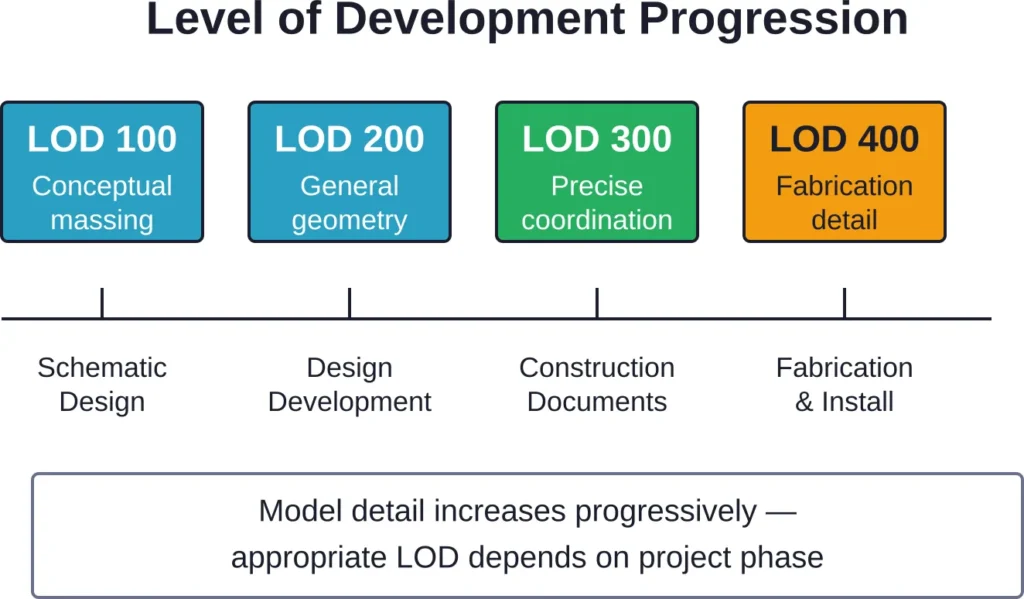
Effective BIM implementation requires clarity about model detail and information completeness at each project phase. That’s where Level of Development specifications come in.
The Level of Development (LOD) Specification from BIM Forum provides a reference that enables practitioners to specify and articulate with clarity the content and reliability of building information models at various stages. The LOD Specification builds on LOD definitions developed by the AIA for the AIA G202-2013 Building Information Modeling Protocol Form.
LOD ranges from conceptual representations (LOD 100) through construction-ready detail (LOD 350-400) to as-built documentation (LOD 500). Specifying appropriate LOD for each project phase prevents both under-modeling (insufficient detail for decision-making) and over-modeling (wasted effort on unnecessary precision).
Organizations working in Revit should establish LOD expectations in their BIM execution plans and project contracts. These standards clarify deliverables and manage expectations across project teams.
The Future of Revit and BIM
Technology keeps evolving. Where are Revit and BIM methodology heading?
Cloud Collaboration and Connected Data
The shift from desktop-centric workflows to cloud platforms continues. Autodesk’s investments in cloud services—BIM Collaborate Pro, Forma, and others—indicate the direction. Models become accessible from anywhere, real-time collaboration replaces file-based exchange, and data flows more freely between applications.
Artificial Intelligence and Automation
AI capabilities are beginning to appear in design software. Generative design tools explore thousands of design alternatives based on defined constraints. Automated clash detection and resolution suggestions reduce manual coordination effort. These capabilities will expand, though human judgment and creativity remain essential.
Extended Reality and Immersive Review
Virtual and augmented reality applications let teams experience designs before construction. Walking through a building model in VR reveals spatial qualities that flat screens can’t convey. AR applications overlay design information onto construction sites for installation guidance and verification.
Digital Twins and Lifecycle Management
The BIM model’s role increasingly extends beyond design and construction into facility operation. Digital twins—live data models connected to building systems—enable predictive maintenance, energy optimization, and space management. Revit models can serve as the foundation for these operational systems.
Making the Decision: Is Revit Right For Your Needs?
Should an organization adopt Revit? The answer depends on multiple factors.
Consider project types. Large, complex, multi-discipline buildings benefit most from Revit’s coordination capabilities. Smaller, simpler projects may not justify the software investment and learning curve.
Evaluate market expectations. If clients and collaborators expect Revit deliverables, the decision becomes clear. Regional markets vary—understanding local standards matters.
Assess team capabilities. Revit implementation requires commitment to training, process development, and potentially staffing changes. Organizations need realistic timelines and appropriate resources.
Understand that Revit is a tool, not a solution. Simply purchasing licenses won’t deliver BIM benefits. Success requires methodology implementation, workflow redesign, and cultural change.
For many architecture, engineering, and construction firms, Revit has become essentially mandatory. The question isn’t whether to adopt it, but how to implement it effectively while truly embracing BIM methodology rather than just deploying expensive drafting software.
Frequently Asked Questions
No. BIM (Building Information Modeling) is a methodology and process for creating, managing, and sharing building data throughout a project lifecycle. Revit is software—one of several tools that enable BIM workflows. Teams can use Revit without implementing true BIM methodology, and they can practice BIM using different software platforms. Revit is a BIM tool, but BIM itself is much broader than any single application.
AutoCAD experience isn’t required to learn Revit, though it can be helpful. Revit operates quite differently from AutoCAD—it’s parametric and object-based rather than line-based. Some AutoCAD concepts transfer, but many Revit workflows are fundamentally different. Beginners without CAD background often adapt quickly because they don’t need to unlearn drafting-based approaches.
Basic competency typically requires three to six months of consistent practice and project work. Reaching true proficiency—including advanced families, complex coordination, and efficient workflows—generally takes one to two years. The learning curve extends beyond software mechanics to understanding building construction, systems coordination, and BIM methodology. Continuous learning remains important as the software evolves and project complexity increases.
Yes, though interoperability has limitations. Revit exports and imports IFC (Industry Foundation Classes) files, the open standard for BIM data exchange maintained by buildingSMART International. Teams can coordinate Revit models with ArchiCAD, Tekla, Bentley products, and other BIM applications through IFC. BCF (BIM Collaboration Format) enables issue tracking across platforms. However, some data loss and translation challenges occur—direct coordination between identical software platforms remains easier than multi-platform workflows.
Revit demands robust hardware. The software requires 64-bit Windows, and Autodesk recommends multi-core processors (higher clock speeds matter more than core count for many operations), at least 16GB RAM (32GB or more for large projects), dedicated graphics cards with substantial memory, and fast SSD storage. Check Autodesk’s official system requirements for the specific version, as these requirements increase with each release. Inadequate hardware causes frustration through slow performance and crashes.
Revit serves multiple disciplines. Architects use it for building design, structural engineers for framing systems, MEP engineers for building systems, and contractors for coordination and quantity takeoffs. The software includes specialized toolsets for architecture, structure, and MEP work. BIM specialists, facility managers, and even some specialty consultants use Revit for their portions of projects. Modern Revit licenses typically include all disciplines, allowing firms to work across specializations.
Revit LT is a lighter version with reduced capabilities and lower cost. It lacks worksharing (collaborative multi-user access), advanced modeling features, rendering capabilities, and some analysis tools. Regular Revit provides the complete feature set including worksharing, advanced families, rendering, energy analysis, and full coordination capabilities. For professional practice on collaborative projects, full Revit is typically necessary. Check the official Autodesk website for current feature comparisons and pricing, as these details change.
Conclusion: Understanding Revit’s Role in Modern Building Design
Revit stands as one of the most influential tools in modern architecture, engineering, and construction. But its true value emerges only when organizations grasp the fundamental distinction: Revit is software that enables BIM methodology, not a replacement for it.
The software’s parametric modeling, intelligent components, coordination capabilities, and data-rich approach support collaborative workflows that traditional drafting simply cannot. These capabilities align perfectly with BIM principles of lifecycle information management, multi-discipline coordination, and single-source truth.
Yet technology alone doesn’t deliver results. Organizations that successfully leverage Revit invest in training, develop clear workflows, establish standards, and commit to the cultural changes that true BIM collaboration requires. They understand that buying licenses is the easy part—the real work lies in implementation.
For professionals entering or advancing in architecture, engineering, and construction fields, Revit proficiency has become virtually essential. The software appears in job requirements across the industry, and its capabilities define how modern buildings get designed and built.
The relationship between Revit and BIM will continue evolving as cloud collaboration, artificial intelligence, and extended reality reshape workflows. But the core principle remains: BIM is the methodology, Revit is a tool that helps implement it. Organizations that grasp this distinction position themselves for success in an increasingly digital construction industry.
Ready to explore Revit capabilities for your projects? Visit Autodesk’s official website for current licensing options, system requirements, and trial versions. Consider hands-on training programs that teach both software skills and BIM methodology—the combination delivers real competency. And remember: successful Revit implementation requires commitment beyond just software deployment. Invest in the complete package of technology, training, and process development for results that justify the effort.